} "RISC-V") ## 🤔 Shortcomings of WebAssembly for Smart Contracts
From ink! v1 to v5, the execution platform was Substrate's smart contracts
module [`pallet-contracts`](https://github.com/paritytech/polkadot-sdk/tree/master/substrate/frame/contracts/).
This pallet required the smart contracts that were uploaded to be in the _WebAssembly
(Wasm) bytecode format_. So ink! contracts were always compiled to a WebAssembly binary.
This could be done by invoking `cargo build`/`rustc` directly or via our CLI tool
[`cargo-contract`](https://github.com/use-ink/cargo-contract) (which executes the
Rust compiler with optimal flags for smart contracts).
As an ongoing research project Parity was always looking at alternatives to WebAssembly
for smart contract execution. Some of those investigations are
persisted in the Polkadot Forum. The forum post on [the eBPF investigation](https://forum.polkadot.network/t/ebpf-contracts-hackathon/1084)
(eBPF is used in Solana) highlights some shortcomings of WebAssembly for smart contracts.
## 🧑🔬 RISC-V + PolkaVM
During 2023, Parity core developer Jan Bujak ([@koute](https://github.com/koute)) did another
exploration on alternatives for WebAssembly. [His forum post](https://forum.polkadot.network/t/exploring-alternatives-to-wasm-for-smart-contracts/2434)
gives a great overview on how he landed at RISC-V and its potential.
His explorations yielded promising results and a new project
was started: [PolkaVM](https://github.com/paritytech/polkavm)
([the announcement contains more info](https://forum.polkadot.network/t/announcing-polkavm-a-new-risc-v-based-vm-for-smart-contracts-and-possibly-more/3811)).
PolkaVM is intended to be a very fast RISC-V based virtual machine. Jan
regularly shared performance benchmarks in the Polkadot Forum. Those were very
good and got community enthusiasm started.
For blockchains a very fast performance correlates with transaction throughput
and transaction costs, which implies improved scalability and reduced costs for users.
## 🤝 `pallet-revive`
Parity in late 2024 forked Substrate's `pallet-contracts` into a new project called
[`pallet-revive`](https://github.com/paritytech/polkadot-sdk/tree/master/substrate/frame/revive).
Smart contracts that are uploaded to this new pallet have to be
in the RISC-V bytecode format, and no longer in WebAssembly.
Besides the contract binary format, a number of other significant changes were
made to provide first-class support for Solidity contracts:
* Extensive changes were made in the inner logic of the pallet to bring its behavior
closer to the EVM (e.g. types, events, and debugging was changed to be Solidity
compatible).
* In the `pallet-contracts` era, the idea for Solidity compatibility was a project
called [Solang](https://github.com/hyperledger-solang/solang/). It's a Solidity
compiler that parses Solidity syntax and outputs WebAssembly.
Parsing the Solidity syntax turned out to be a complex undertaking. Solidity
as a language is also evolving and provided a moving target.
## 🤔 Shortcomings of WebAssembly for Smart Contracts
From ink! v1 to v5, the execution platform was Substrate's smart contracts
module [`pallet-contracts`](https://github.com/paritytech/polkadot-sdk/tree/master/substrate/frame/contracts/).
This pallet required the smart contracts that were uploaded to be in the _WebAssembly
(Wasm) bytecode format_. So ink! contracts were always compiled to a WebAssembly binary.
This could be done by invoking `cargo build`/`rustc` directly or via our CLI tool
[`cargo-contract`](https://github.com/use-ink/cargo-contract) (which executes the
Rust compiler with optimal flags for smart contracts).
As an ongoing research project Parity was always looking at alternatives to WebAssembly
for smart contract execution. Some of those investigations are
persisted in the Polkadot Forum. The forum post on [the eBPF investigation](https://forum.polkadot.network/t/ebpf-contracts-hackathon/1084)
(eBPF is used in Solana) highlights some shortcomings of WebAssembly for smart contracts.
## 🧑🔬 RISC-V + PolkaVM
During 2023, Parity core developer Jan Bujak ([@koute](https://github.com/koute)) did another
exploration on alternatives for WebAssembly. [His forum post](https://forum.polkadot.network/t/exploring-alternatives-to-wasm-for-smart-contracts/2434)
gives a great overview on how he landed at RISC-V and its potential.
His explorations yielded promising results and a new project
was started: [PolkaVM](https://github.com/paritytech/polkavm)
([the announcement contains more info](https://forum.polkadot.network/t/announcing-polkavm-a-new-risc-v-based-vm-for-smart-contracts-and-possibly-more/3811)).
PolkaVM is intended to be a very fast RISC-V based virtual machine. Jan
regularly shared performance benchmarks in the Polkadot Forum. Those were very
good and got community enthusiasm started.
For blockchains a very fast performance correlates with transaction throughput
and transaction costs, which implies improved scalability and reduced costs for users.
## 🤝 `pallet-revive`
Parity in late 2024 forked Substrate's `pallet-contracts` into a new project called
[`pallet-revive`](https://github.com/paritytech/polkadot-sdk/tree/master/substrate/frame/revive).
Smart contracts that are uploaded to this new pallet have to be
in the RISC-V bytecode format, and no longer in WebAssembly.
Besides the contract binary format, a number of other significant changes were
made to provide first-class support for Solidity contracts:
* Extensive changes were made in the inner logic of the pallet to bring its behavior
closer to the EVM (e.g. types, events, and debugging was changed to be Solidity
compatible).
* In the `pallet-contracts` era, the idea for Solidity compatibility was a project
called [Solang](https://github.com/hyperledger-solang/solang/). It's a Solidity
compiler that parses Solidity syntax and outputs WebAssembly.
Parsing the Solidity syntax turned out to be a complex undertaking. Solidity
as a language is also evolving and provided a moving target.As an iteration on that approach, for `pallet-revive` Parity started a new project called [`revive`](https://github.com/paritytech/polkadot-sdk/tree/master/substrate/frame/revive/src) ᠆ a compiler from the Solidity bytecode YUL to a RISC-V contract that can be executed on `pallet-revive`. This bytecode is more stable than the language syntax. Plus Solidity developers can continue to use the Solidity compiler `solc` to compile their contracts. * An RPC wrapper that maps Ethereum RPC's onto Substrate was created. At the time of writing, `pallet-revive` is deployed to the Polkadot testnet Westend (on the AssetHub parachain). A launch on Polkadot's canary network Kusama is targeted for early Q2/25. The Polkadot launch is targeted for Q3/25. ## 🙌 Migrating ink! to RISC-V + PolkaVM + `pallet-revive` `pallet-revive` and RISC-V are seen as the future of smart contracts in the Polkadot ecosystem. We agree with that vision and are excited to work on making the ink! stack ready for it! In autumn 2024 the ink! Alliance created [a Polkadot treasury proposal](https://forum.polkadot.network/t/treasury-ink-alliance-for-a-more-successful-plaza/9692) around this. The Polkadot community signaled its alignment and gave us the mandate of migrating ink! to this new stack. Hence, v5 of ink! and `cargo-contract` were the last versions supporting `pallet-contracts` and Wasm. We can still backport important fixes, but the coming releases (`>= v6`) will all no longer be compatible. In case you want to create a PR for a backport, we have v5 release branches [here](https://github.com/use-ink/ink/tree/v5.x) and [here](https://github.com/use-ink/cargo-contract/tree/v5.x.x). We have created [this migration guide](/docs/v6/faq/migrating-from-ink-5-to-6) from ink! v5 to v6. All breaking changes and new features are documented there. What has not yet been migrated is [Contracts UI](https://github.com/use-ink/contracts-ui) and external libraries (such as [ink!athon](https://inkathon.xyz/), the [ink! Analyzer VS Code extension](https://marketplace.visualstudio.com/items?itemName=ink-analyzer.ink-analyzer), `polkadot-js`, …). We are in contact with the maintainers of these external libraries about migrating them as well. ```` ## File: docs/background/why-rust.md ````markdown --- title: Why Rust for Smart Contracts? hide_title: true slug: /background/why-rust-for-smart-contracts ---  # Why Rust for Smart Contracts? ink! chooses not to invent a new programming language, but rather adapt a subset of Rust to serve our purpose. If this doesn't already convince you, you find many more good reasons here: * Rust is an ideal smart contract language: It is type safe, memory safe, and free of undefined behaviors. It generates small binaries because it doesn’t include extra bloat, like a garbage collector, and advanced optimizations and tree shaking remove dead code. Through compiler flags, Rust can automatically protect against integer overflow. * Rust ecosystem: You gain all the support available to the Rust ecosystem for free. As the language develops, ink! will automatically gain access to new features and functionality, improving how you can write smart contracts in the future. * Tooling: Because ink! follows Rust standards, tools like rustfmt, clippy and rust-analyzer already work out of the box. The same goes for code formatting and syntax highlighting in most modern text editors. Also, Rust has an integrated test and benchmark runner, * No overhead: Minimal runtime. * Safe & Efficient: Zero-cost & safe abstractions. * Productive: Cargo + crates.io Ecosystem. * 1st class RISC-V: The Rust compiler has excellent support for the RISC-V bytecode architecture. That's because it leverages LLVM as its backend to generate machine code for the RISC-V architecture. * Small Size: In the space-constrained blockchain world size is important. The Rust compiler is a great help for that, since it reorders struct fields in order to make each type as small as possible. Thus, Rust data structures are very compact, in many cases even more compact than in C. ink! is an [Embedded Domain Specific Language](https://wiki.haskell.org/Embedded_domain_specific_language) (eDSL): a domain-specific language of the Rust programming language. That means: * we allow only a subset of the Rust programming language features to be used for writing smart contracts. For example, it is not possible do any multi-threading operations or access the web. * we provide annotations, macros, and primitives that are needed when writing smart contracts. For example, annotations on what the smart contract's storage struct is or what an event is. ink! is just standard Rust in a well-defined "contract format" with specialized `#[ink(…)]` attribute macros. These attribute macros tell ink! what the different parts of your Rust smart contract represent, and ultimately allow ink! to do all the magic needed to create Polkadot SDK compatible RISC-V bytecode! ```` ## File: docs/basics/abi/all.md ````markdown --- title: | "All" ABI Mode hide_title: true slug: /basics/abi/all ---  # "All" ABI Mode The "all" ABI mode is declared in the contract's manifest file (i.e. the `Cargo.toml` file) as follows: ```toml [package.metadata.ink-lang] abi = "all" ``` When the "all" ABI is specified, the ink! code generator follows both the ink! and Solidity ABI specifications, and generates entry points for both calling conventions. This means: - For each message, two selectors are generated, one for [ink!](./ink.md) and another for [Solidity](./solidity.md) ABI. - Each selector is ABI specific and its entry point uses the corresponding input/output encoding/decoding scheme (i.e. entry points for ink! selectors use Parity's [SCALE Codec][scale-codec], while entry points for Solidity selectors use Solidity ABI encoding/decoding for input/output encoding/decoding). - Message selector manual overrides (using the [`selector` attribute][selector-attribute]) are respected for ink! ABI entry points but ignored for Solidity ABI entry points (i.e. Solidity selectors are **always** generated according to the [Solidity ABI specification for function selectors][sol-abi-selector]). - Multiple constructors are supported (as per the ink! ABI), however, if multiple constructors are defined, then one of the constructors must be annotated with the [`default` attribute][default-attribute] to identify it as the constructor to use for Solidity ABI encoded instantiation. Note that if only a single constructor is defined, then the `default` attribute annotation is unnecessary. - Call builders and [contract references][contract-refs] are generated for both ink! and Solidity ABI calling conventions. - Both an ink! and Solidity ABI encoded event are emitted for each call to `Self::env().emit_event()` or `self.env().emit_event()`. :::note Your contract sizes will get larger if you support both the ink! and Solidity ABI. ::: :::note The "all" ABI mode can only be used if all message argument and return types, the argument and return type of the constructor used for Solidity ABI encoded instantiation, and event argument types can be mapped to equivalent Solidity ABI types ([more details here][sol-type-mapping]). ::: [scale-codec]: https://docs.rs/parity-scale-codec/latest/parity_scale_codec [sol-abi-selector]: https://docs.soliditylang.org/en/latest/abi-spec.html#function-selector [selector-attribute]: ../../macros-attributes/selector.md [default-attribute]: ../../macros-attributes/default.md [contract-refs]: ../cross-contract-calling.md#contract-references [sol-type-mapping]: ../../integrations-and-sdks/ethereum-compatibility.md#rustink-to-solidity-abi-type-mapping ```` ## File: docs/basics/abi/ink.md ````markdown --- title: ink! ABI hide_title: true slug: /basics/abi/ink ---  # ink! ABI The ink! ABI is declared in the contract's manifest file (i.e. the `Cargo.toml` file) as follows: ```toml [package.metadata.ink-lang] abi = "ink" ``` When the ink! ABI is specified, the ink! code generator follows the ink! ABI specification. This means: - By default, message selectors are generated according to the [ink! ABI specification for selectors][ink-spec-selector]. - Message selectors can be manually overridden using the [`selector` attribute][selector-attribute]. - Parity's [SCALE Codec][scale-codec] is used for input/output encoding/decoding. - Call builders (used for making cross-contract calls) are generated for ink! ABI calling conventions. [ink-spec-selector]: ../selectors.md [selector-attribute]: ../../macros-attributes/selector.md [scale-codec]: https://docs.rs/parity-scale-codec/latest/parity_scale_codec ```` ## File: docs/basics/abi/overview.md ````markdown --- title: Overview hide_title: true slug: /basics/abi ---  # ABI (Application Binary Interface) An ABI (Application Binary Interface) defines a standard way to interact with contracts (i.e. it defines the calling conventions to use for public function calls). More concretely this entails specifications for: - Computing or defining selectors which identify the entry points for public function calls - Encoding and decoding public function input and output data - Encoding and decoding event and error data With ink! v6, the ink! code generator supports two ABI specifications: - [Our own native ink! ABI specification](./ink.md) - [The Solidity ABI specification](./solidity.md) Supporting the Solidity ABI specification allows: - Solidity contracts to transparently call ink! contracts - Developers to use Solidity tools (e.g. [ethers.js][ethers-js]) to transparently interact with ink! contracts. Additionally, the ink! code generator can operate in an [`"all"` ABI mode](./all.md), where it generates a binary that supports both the ink! and Solidity ABI specifications (i.e. it generates a binary that transparently supports both ink! and Solidity calling conventions, and thus transparently supports interactions from both ink! and Solidity contracts and external tools). ## Declaring the ABI The ABI for an ink! contract is declared in the contract's manifest file (i.e. the `Cargo.toml` file), as a field `abi` of a custom `ink-lang` table in the [`package.metadata` table][package-metadata] e.g. ```toml [package.metadata.ink-lang] abi = "sol" ``` The default value for `abi` is currently `"ink"`, but we might change this before a production release. Allowed values are `"ink"`, `"sol"` and `"all"`. :::note The Solidity ABI specification can only be used if all constructor and message argument and return types, and event argument types can be mapped to equivalent Solidity ABI types ([more details here][sol-type-mapping]). ::: :::note Your contract sizes will get larger if you support both the ink! and Solidity ABI. ::: [package-metadata]: https://doc.rust-lang.org/cargo/reference/manifest.html#the-metadata-table [ethers-js]: https://docs.ethers.org/ [sol-type-mapping]: ../../integrations-and-sdks/ethereum-compatibility.md#rustink-to-solidity-abi-type-mapping ```` ## File: docs/basics/abi/solidity.md ````markdown --- title: Solidity ABI hide_title: true slug: /basics/abi/solidity ---  # Solidity ABI The Solidity ABI is declared in the contract's manifest file (i.e. the `Cargo.toml` file) as follows: ```toml [package.metadata.ink-lang] abi = "sol" ``` When the Solidity ABI is specified, the ink! code generator follows the [Solidity ABI specification][sol-abi]. This means: - Message selectors are **always** generated according to the [Solidity ABI specification for function selectors][sol-abi-selector]. - Message selector manual overrides using the [`selector` attribute][selector-attribute] are ignored. - [Solidity ABI encoding][sol-abi-codec] is used for input/output encoding/decoding. - Only one constructor can be defined for the contract. - Call builders are generated for Solidity ABI calling conventions. :::note The Solidity ABI specification can only be used if all constructor and message argument and return types, and event argument types can be mapped to equivalent Solidity ABI types ([more details here][sol-type-mapping]). ::: :::info The contract ABI only describes how external interactions with a contract are encoded/decoded. The internal storage representation of a contract is still done in the SCALE codec! _Using the Solidity ABI does not imply switching to a different storage layout!_ ::: [sol-abi]: https://docs.soliditylang.org/en/latest/abi-spec.html [sol-abi-selector]: https://docs.soliditylang.org/en/latest/abi-spec.html#function-selector [selector-attribute]: ../../macros-attributes/selector.md [sol-abi-codec]: https://docs.soliditylang.org/en/latest/abi-spec.html#formal-specification-of-the-encoding [sol-type-mapping]: ../../integrations-and-sdks/ethereum-compatibility.md#rustink-to-solidity-abi-type-mapping ```` ## File: docs/basics/metadata/ink-format.md ````markdown --- title: ink! Format hide_title: true slug: /basics/metadata/ink ---  # ink! Metadata The ink! metadata is generated when a contract is built using `cargo-contract`, e.g `cargo contract build`. It can be found in your contract's target directory under the name `
})
})
})
}) This little cute purple squid is Squink.
This little cute purple squid is Squink.Squink is the mascot of ink! and guides new users and adventurers through our presentations workshops and tutorials. It also has a romance with Rust's mascot, Ferris. Generally it is very friendly and open to learning new Rustaceans but be aware to never upset it by taking away dots from the word ink! by spelling it incorrectly! It really is into dots. Stories tell that it demanded the spelling of ink! with as many dots as possible.
Is it "ink" or "ink!"? What does the "!" stand for?
The correct spelling is _ink!_ ‒ with a lowercase "i" and an exclamation mark at the end. The history here is that: * …in the very first iteration ink! was originally a [declarative Rust macro](https://doc.rust-lang.org/book/ch19-06-macros.html#declarative-macros-with-macro_rules-for-general-metaprogramming). A contract was invoked by writing `ink!{ … }`. * …there is a real-world analogy here of writing a paper contract using ink. * …we wanted to have as many DOTs as possible in the name 😉. * …the symmetry of the top and bottom dot of i and ! is aesthetically pleasing 🌻. So please don't make poor Squink cry having to read !ink, ink, Ink!, or Ink.})
Why is Rust's standard library (stdlib) not available in ink!?
Rust's standard library consists of three different layers: 1. `core` library which defines everything that has no dependencies outside of Rust itself. Included are types such as `Option`, `Result` as well as a whole variety of modules, functions and macro. ink! smart contracts allow authors to use Rust's `core` crate. 2. `alloc` library which is depending on a global allocator and mainly defines collections that spill their elements on to the execution's heap memory. Examples for collections are `Box`, `String`, `Vec`, `HashMap`, `LinkedList` and modules such as `fmt`, `rc` (ref-counted pointers) or borrows. ink! smart contracts allow authors to use Rust's `alloc` crate. By default ink! authors use definitions from the `alloc` crate through `ink::prelude` crate. 3. `std` library is what people generally call Rust's standard library. > The Rust Standard Library is the foundation of portable Rust software, a set of minimal and battle-tested shared abstractions for the broader Rust ecosystem. It requires several operating system capabilities in order to work correctly such as input and output systems for files, networking etc. Since our RISC-V compilation target does not support Rust's standard library ink! authors cannot use it either for their own purposes. Instead the [`pallet-revive`](https://github.com/paritytech/polkadot-sdk/tree/master/substrate/frame/revive) tries to provide some common functionality that would otherwise be missing for common smart contract operations. ### Overflow Safety? Being written in Rust, ink! provides robust overflow/underflow safety using compiler-level overflow checks as follows: - `const` integer arithmetic operations (i.e. expressions involving only `const` integer operands) are checked for overflows at compile-time (e.g. `255u8 + 1` will lead to a compilation error due to overflow). - For dynamic integer arithmetic operations, ink! (more specifically [`cargo-contract`][cargo-contract]) automatically enables Rust's ["overflow-checks" instrumentation][rustc-overflow-checks], which automatically adds dynamic/runtime checks that panic on overflow. [cargo-contract]: ../getting-started/setup.md#cargo-contract [rustc-overflow-checks]: https://doc.rust-lang.org/rustc/codegen-options/index.html#overflow-checks However, where possible, it's preferred to explicitly handle the possibility of overflow using the following family of methods that are provided for primitive numeric types in Rust: - `wrapping_*` methods for explicit wrapping behaviour (e.g. [`wrapping_add`][wrapping-add]) - `checked_*` methods which return `None` in case of overflow (e.g. [`checked_add`][checked-add]) - `saturating_*` methods which saturate at the type's minimum or maximum value (e.g. [`saturating_add`][saturating-add]) - `overflowing_*` methods which return the value and a `bool` flag indicating whether an overflow occurred (e.g. [`overflowing_add`][overflowing-add]) [wrapping-add]: https://doc.rust-lang.org/std/primitive.u8.html#method.wrapping_add [checked-add]: https://doc.rust-lang.org/std/primitive.u8.html#method.checked_add [saturating-add]: https://doc.rust-lang.org/std/primitive.u8.html#method.saturating_add [overflowing-add]: https://doc.rust-lang.org/std/primitive.u8.html#method.overflowing_add :::note Unlike default `rustc`/`cargo` behavior, ink! (more specifically [`cargo-contract`][cargo-contract]) automatically enables dynamic overflow checks in release mode by default (i.e. dynamic overflow checks are enabled when compiling with `cargo contract build --release`). However, `cargo-contract` still allows you to override this behavior using the ["overflow-checks" setting][cargo-overflow-checks] for the release profile in your contract's manifest file (i.e. `Cargo.toml`). ::: [cargo-overflow-checks]: https://doc.rust-lang.org/cargo/reference/profiles.html#overflow-checks :::caution Apart from [integer arithmetic operations][arithmetic-operations], another cause of implicit overflows is [integer type cast expressions (i.e. `as` conversions)][as-conversions]. However, unlike integer arithmetic operations, Rust's ["overflow-checks" instrumentation][rustc-overflow-checks] doesn't add overflow checks for integer type cast expressions (e.g. `256u16 as u8`). The motivation for this decision is explained [here][overflow-rfc-as]. As a less robust alternative, ink! provides a `cargo contract lint` command, which (in addition to our [custom lints][custom-lints]) enables the following [`clippy`][clippy] lints to check for overflowing/underflowing and lossy integer type cast expressions **in the local crate** (i.e. the following lints only check code from the local crate, they don't check code from dependencies). - https://rust-lang.github.io/rust-clippy/master/index.html#cast_possible_truncation - https://rust-lang.github.io/rust-clippy/master/index.html#cast_possible_wrap - https://rust-lang.github.io/rust-clippy/master/index.html#cast_sign_loss In the future, ink! may provide more robust checks for overflows due integer type cast expressions (i.e. `as` conversions). ::: [arithmetic-operations]: https://doc.rust-lang.org/reference/expressions/operator-expr.html#arithmetic-and-logical-binary-operators [as-conversions]: https://doc.rust-lang.org/reference/expressions/operator-expr.html#semantics [overflow-rfc-as]: https://rust-lang.github.io/rfcs/0560-integer-overflow.html#making-as-be-checked [custom-lints]: ../linter/overview.md [clippy]: https://doc.rust-lang.org/clippy/ ### What is the difference between memory and storage? In ink!, memory refers to computer memory, while storage refers to the on-chain storage used by a contract instance. Memory is temporary and only lasts until the contract execution is done, while storage is persistent and lasts over many contract executions. The contract storage is built on top of the runtime storage, and access is considered to be slow. ### How do I hash a value? A number of crypto hashes are built into [`pallet-revive`](../background/polkadot-sdk.md) and therefore very efficient to use. We currently support a handful of those, you can view the complete list [here](https://use-ink.github.io/ink/ink_env/hash/trait.CryptoHash.html). If you have the urgent need for another crypto hash you could introduce it through [Precompiles](../basics/precompiles.md) or make a proposal to include it into the default set of the `pallet-revive`. Using one of the built-in crypto hashes can be done as explained here: * [`self.env().hash_bytes()`](https://use-ink.github.io/ink/ink_env/fn.hash_bytes.html) * [`self.env().hash_encoded()`](https://use-ink.github.io/ink/ink_env/fn.hash_encoded.html) ### Why is it not possible to use floating point data types in ink!? How do I implement returning a decimal number? Floats are cool for all kinds of reasons, but they also have one important drawback. Floating point arithmetic is non-deterministic which means that different processors compute (slightly) different results for the same operation. Although there is an IEEE spec, non-determinism can come from specific libraries used, or even hardware. In order for the nodes in a blockchain network to reach agreement on the state of the chain, all operations must be completely deterministic. Hence, we don't allow floating point data types in ink!. Consequently, it's not possible to return a decimal number from an ink! message. What you should do instead is to have your user interface denominate the returned number to decimals. Note, that it's typical for blockchains to have the number of available tokens defined as a non-floating number and determine the denomination in the user interface. For example, 1 Bitcoin is equivalent to the smallest unit of 100,000,000 Satoshi and all Bitcoin implementations internally persist account balances in Satoshi, not as a decimal number of Bitcoin. ### Why can't I just use the standard Rust data collections in ink!? You can use them! They are exposed via the `ink_prelude` crate (e.g. `ink::prelude::vec::Vec`) and you can return them from ink! messages and also persist them to storage. _However, the Rust stdlib collections are not optimized for smart contract usage!_ So for example, if you use them to persist your data on the chain they will always occupy a single storage cell and thus always be loaded eagerly, in their entirety. This can be very costly! Just think about a `Vec` or a `HashMap` where the smart contract might only need access to a few elements, rather than the entire data collection. ### Why am I getting a `ContractTrapped` error when interacting with a contract? When it does not constitute a deliberate assertion, like for example a permission check, it is most likely a bug in your contract or in ink!. A common source of `ContractTrapped` are Integer overflows, those can cause your contract to trap as well. ### What are the `Encode`, `Decode` and `TypeInfo` arguments in `#[ink::scale_derive(Encode, Decode, TypeInfo)]` ? Polkadot SDK-based blockchains use the [SCALE codec](https://github.com/paritytech/parity-scale-codec) to encode data. As a consequence the data for every interaction with Polkadot SDK needs to be SCALE-encodable ‒ i.e. it needs to implement either `scale::Encode`, `scale::Decode`, or both. This affects e.g. data you want to return to a caller, data that you want to take as input, or data you want to store on-chain. ink! re-exports these traits and provides a useful macro `#[ink::scale_derive(Encode, Decode, TypeInfo)]` that allows to derive them in a concise way. A common error you might get when a necessary SCALE trait is not implemented for a data structure could be along the lines of `the trait "WrapperTypeEncode" is not implemented for "Foo"`. For example, you might encounter this error if you try to store a custom data structure in the contract's storage. Or e.g. when attempting to return a custom error from an ink! message. :::note The error `the trait "WrapperTypeEncode" is not implemented for …` is also a common error when a mismatching version of `parity-scale-codec` is used in the contract opposed to the version used by ink!. ::: The solution typically is to add a fitting implementation of the trait for your data structure: * `Encode` is used for encoding a data structure when it is e.g. returned to a caller or when it is persisted to the contracts storage. * `Decode` is used for the inverse, e.g. when reading from storage or taking an input from a user (or another contract). * `TypeInfo` is used to encode the information about the type that is often used for the generation of metadata. It's possible to derive those traits and oftentimes the simplest way is to just derive the missing trait for the object for which its implementation is missing using the ink! macro: ```rust #[ink::scale_derive(Encode, Decode)] struct MyCustomDataStructure { … } ``` ### How do I use `String` in my contract? In general, you should think twice if you really need `String`. Smart contracts usually don't use strings; those are typically used for user interactions and should live in your UI and not on the chain. Minimizing storage usage of your contract is a best practice and you should only persist items which you need to derive state transitions in your contract. If you still, for some reason, need to use `String`, then you should use the `String` [from the ink! prelude](https://use-ink.github.io/ink/ink_prelude/string/struct.String.html).Getting a warning in cargo-contract about type compatibility?
ink! and Polkadot SDK both support the possibility of deciding to deviate
from the default types for `Balance`, `BlockNumber`, etc.
These types are called environment types.
If a chain decides on custom environment types, contract authors need
to specify these types that deviate from the ink! default environment in their
contracts. Otherwise, undefined behavior can occur when uploading a contract
with deviating types to a chain.
Custom environment types can be specified in ink! via the `#[contract(env = MyCustomEnvironment)]`
attribute. You can read more are about this [here](../macros-attributes/contract.md#env-impl-environment).
When using `cargo-contract` to interact with a chain you might get a warning along those lines:
```
Warning: This chain does not yet support checking for compatibility of your contract types.
```
This warning appears when the chain that you are targeting (via the `--url` cli flag)
does not contain a version of `pallet-revive` that does support type comparison.
Type comparison is a feature that we introduced, it means we check that the environmental
types of your contract are equivalent to the environmental types of the chain that you are
targeting.
It's a safety feature to make sure that you are not accidentally deploying a contract with
e.g. `type Balance = u128` to a chain with a different `Balance` type.
The `cargo-contract` warning means this check for compatible types cannot be performed.
If a chain indeed requires that contract developers have to use custom environment types,
this should be communicated prominently by them.
### When an ink! contract is compiled with support for the Solidity ABI (abi = "sol" or "all"), does anything about its on-chain storage change?
No. The internal storage representation of a contract is still done in the SCALE codec!
The contract ABI only describes how external interactions with a contract are
encoded/decoded.
Using the Solidity ABI does not imply switching to a different storage layout!
````
## File: docs/faq/migrating-from-ink-3-to-4.md
````markdown
---
title: "Migration: ink! v3 → v4"
slug: /faq/migrating-from-ink-3-to-4
---
We've made a couple of breaking changes from ink! 3.x to ink! 4.0.
On this page we outline how you can migrate existing clients and
contracts from 3.x to 4.0.
:::caution
This migration guide is only for your code base!
If you have an existing contract on-chain you cannot just
upgrade the code on-chain ‒ you also have to migrate your data,
since the way ink! 4.0 stores data and reads it (i.e. the storage
layout) changes from ink! 3.x to 4.0.
:::
## Compatibility
ink! 4.0 is compatible with:
- Stable Rust >= 1.63.0
- `scale` >=3
- `scale-info` >= 2.3
- `pallet-contracts` >= `polkadot-v0.9.37`
- `substrate-contracts-node` >= `v0.24.0`
- `polkadot-js/api` and `polkadot-js/api-contract` >= 9.10.2
## `cargo-contract` 2.0
Together with ink! 4.0 we've released `cargo-contract` 2.0.
You have to use this latest version of `cargo-contract` for ink! 4.0
contracts.
You can upgrade via:
```rust
cargo install cargo-contract --force --version 2
```
Make sure that e.g. your CI also uses `cargo-contract` 2 with ink! 4.
If you have wrapper scripts around `cargo-contract` you should
ensure that this version is enforced, otherwise users will get an error.
:::note
`cargo-contract` no longer requires `binaryen` or `wasm-opt` as an
external dependency. We required those because of `wasm-opt` tool
(which is part of `binaryen`). Fortunately we were able to find a way of
installing `wasm-opt` now as part of the `cargo-contract` installation
process.
:::
## Rust `stable` instead of `nightly`
ink! 4.0 and `cargo-contract` use `stable` Rust now.
This means no more `cargo +nightly contract` is required, you
can just use a stable Rust toolchain now (>= Rust 1.63).
## New entrance `ink` crate
The `ink_lang` crate has been replaced in [#1223](https://github.com/use-ink/ink/pull/1223)
by a new top level `ink` crate. All existing sub-crates are reexported and should be used via
the new `ink` crate, so e.g. `ink::env` instead of `ink_env`. Contract authors should now import
the top level `ink` crate instead of the individual crates.
### Migration
- In `Cargo.toml` Replace all individual `ink_*` crate dependencies with the `ink` crate.
- In the contract source:
- Remove the commonly used `use ink_lang as ink` idiom.
- Replace all usages of individual crates with reexports, e.g. `ink_env` ➜ `ink::env`.
## Storage API + Layout
With [#1331](https://github.com/use-ink/ink/pull/1331) the way `ink!` reads and writes
to a contract's storage changed. Storage keys are generated at compile-time, and user facing
abstractions which determine how contract data is laid out in storage are different now.
### Migration
- Initialize `Mapping` fields with `Mapping::default()` instead of `ink_lang::utils::initialize_contract` in
constructors. See [`erc20`](https://github.com/use-ink/ink-examples/blob/main/erc20/lib.rs) and other examples which use a `Mapping`.
- `SpreadAllocate`, `SpreadLayout`, `PackedLayout`, `PackedAllocate` have been removed.
## Removal of `wee-alloc` support
ink! uses a bump allocator by default, additionally we supported another allocator
(`wee-alloc`) through a feature flag. `wee-alloc` is no longer maintained and
we removed support for it in [#1403](https://github.com/use-ink/ink/pull/1403).
## Removal of `eth_compatibility` crate
As part of [#1233](https://github.com/use-ink/ink/pull/1233)
the `eth_compatibility` crate was removed. The `ecdsa_to_eth_address()`
function from it can now be found [in the `ink_env` crate](https://docs.rs/ink_env/4.0.0/ink_env/fn.ecdsa_to_eth_address.html).
```rust
ink_env::ecdsa_to_eth_address(&pub_key, &mut output);
```
## `ink_storage::Mapping`
The function signature of `Mapping::insert(key, val)` changed to
`Mapping::insert(key, val) -> OptionClick here for a snippet of the new metadata for the Flipper contract.
```json "messages": [ { "args": [], "docs": [ " Flips the current value of the Flipper's boolean." ], "label": "flip", "mutates": true, "payable": false, "returnType": { "displayName": [ "ink", "MessageResult" ], "type": 1 }, "selector": "0x633aa551" }], "lang_error": { "displayName": [ "ink", "LangError" ], "type": 3 }, { "id": 3, "type": { "def": { "variant": { "variants": [ { "index": 1, "name": "CouldNotReadInput" } ] } }, "path": [ "ink_primitives", "LangError" ] } } ```
 The following chains are in production and support ink! 5.0, if you are not using any of the
four functions mentioned above:
The following chains are in production and support ink! 5.0, if you are not using any of the
four functions mentioned above:








 At the time of the ink! v5 release (March 2024) no parachain with ink! support
had upgraded to `polkadot-v1.8.0` yet.
Please note that if you are using trait definitions for cross-contract calls,
direct calls from the `contract_ref!` macro are only supported with the `call_v2`.
Otherwise, you need to get the `CallBuilder` from the structure
and build the call manually.
```rust
type Erc20Wrapper = contract_ref!(Erc20);
let erc20: Erc20Wrapper = new_erc20.into();
let erc20_builder = erc20.call();
erc20_builder.total_supply().call_v1().invoke()
```
### Metadata Changes
#### Events 2.0
See [#1827](https://github.com/use-ink/ink/pull/1827) for the full details.
Two fields werere added to the objects in the `events` array:
`module_path` and `signature_topic`.
Previously the order of the events in the `events` array was significant (i.e. the first
one had an implied index of `0`), and this index could be used to determine which event
to decode.
Now that is replaced by the `signature_topic`, and the order of the events in the metadata
no longer has any significance.
See the section "[Events 2.0](#events-20)" on this page for more info.
ink! 4.0:
```json
"events": [
{
"args": [ ... ],
"docs": [ ... ],
"label": "Transfer"
},
...
]
```
ink! 5.0:
```diff
"events": [
{
"args": [ ... ],
"docs": [ ... ],
"label": "...",
+ "module_path": "erc20::erc20",
+ "signature_topic": "0xb5b61a3e6a21a16be4f044b517c28ac692492f73c5bfd3f60178ad98c767f4cb"
},
...
]
```
#### New field: `staticBufferSize`
With [#1880](https://github.com/use-ink/ink/pull/1880) we added a `"staticBufferSize"` field to
the metadata file. The unit is bytes.
See the section "[Buffer size can be customized](#buffer-size-can-be-customized)" on this page for
more info.
Example:
```diff
"maxEventTopics": 4,
+ "staticBufferSize": 16384,
"timestamp": { ... }
```
#### Metadata storage keys encoding change
Storage keys used to access storage data are SCALE encoded. Previously,
the contract metadata used big endian encoding to represent storage keys.
With the ink! 5.0 release, these encoding formats have been aligned,
and SCALE encoding (little endian) is now used for the metadata storage keys.
This is a breaking change, and client tools that use the storage keys from contract
metadata will need to adapt accordingly.
Please see: [#2048](https://github.com/use-ink/ink/pull/2048) for details.
Example:
```diff
"storage": {
"root": {
"layout": {
"struct": {
"fields": [
{
"layout": {
"leaf": {
- "key": "0x00000159",
+ "key": "0x59010000",
"ty": 0
}
},
"name": "value"
}
],
"name": "Flipper"
}
},
- "root_key": "0x00000159",
+ "root_key": "0x59010000",
"ty": 1
}
},
```
## Interesting New Features
### End-To-End testing with a chain snapshot
With ink! 5.0 we introduce the possibility of running your tests against the
fork (i.e. snapshot) of a live chain.
See [this page](../testing/testing-with-live-state.md) in our documentation for details.
### New lints
The new lints are:
- [`no_main`](../linter/rules/no_main.md): enforces `no_main` for contracts.
- [`primitive_topic`](../linter/rules/primitive_topic.md): no number types are allowed as event topics.
- [`storage_never_freed`](../linter/rules/storage_never_freed.md): what is written into storage can be removed again.
- [`strict_balance_equality`](../linter/rules/strict_balance_equality.md): detects usage of strict balance equality checks, a common smart contract vulnerability.
- [`non_fallible_api`](../linter/rules/non_fallible_api.md): detects the usage of potentially unsafe methods for which there are safer alternatives.
With `cargo-contract` 4.0 we added a couple new lints for common smart contract issues
and best practices.
You can run the linter via `cargo contract build --lint`.
Details on each lint can be found [here](../linter/overview.md).
### New `cargo-contract` commands
We added a bunch of helpful new commands to `cargo-contract` 4.0.
For all these commands you can also supply the `--help` cli flag to get more
info (e.g. `cargo contract storage --help`).
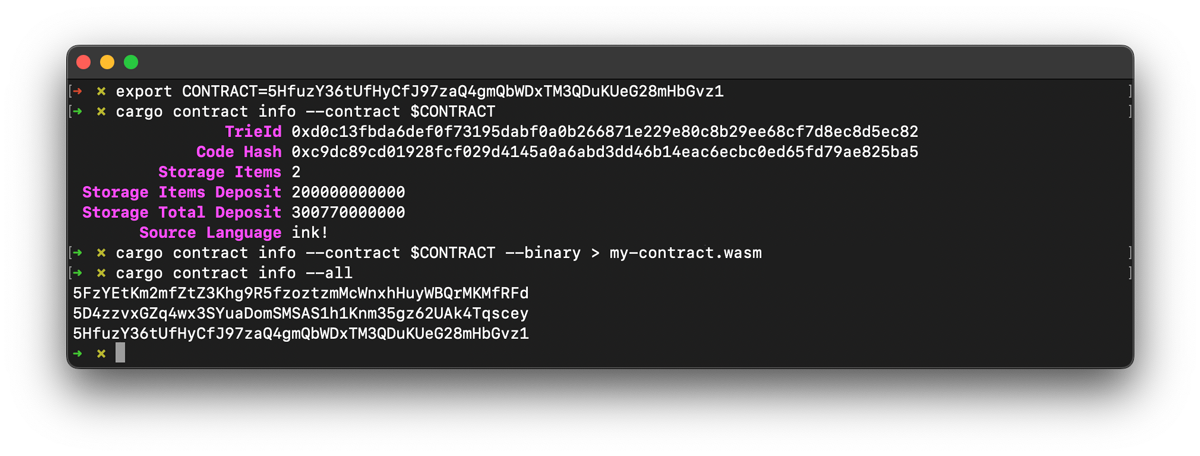
- `cargo contract verify`: contract verification ([#1404](https://github.com/use-ink/cargo-contract/pull/1404), [#1306](https://github.com/use-ink/cargo-contract/pull/1306))
- `cargo contract info` now outputs the language of the deployed contract, using a heuristic ([#1329](https://github.com/use-ink/cargo-contract/pull/1329))
- `cargo contract info --binary`: outputs the on-chain Wasm of the contract ([#1311](https://github.com/use-ink/cargo-contract/pull/1311/))
- `cargo contract info --all`: displays all addresses of deployed contracts on a particular chain ([#1319](https://github.com/use-ink/cargo-contract/pull/1319))
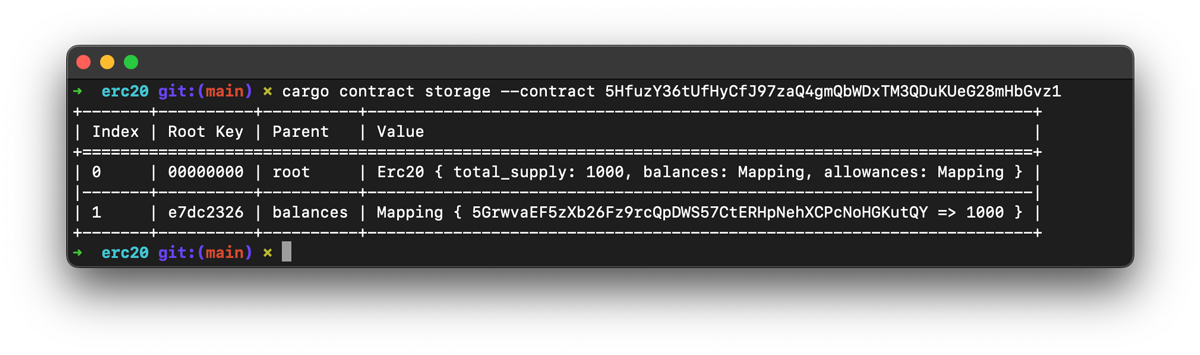
- `cargo contract storage`: displays the storage of an on-chain contract ([#1395](https://github.com/use-ink/cargo-contract/pull/1395), [#1414](https://github.com/use-ink/cargo-contract/pull/1414))
At the time of the ink! v5 release (March 2024) no parachain with ink! support
had upgraded to `polkadot-v1.8.0` yet.
Please note that if you are using trait definitions for cross-contract calls,
direct calls from the `contract_ref!` macro are only supported with the `call_v2`.
Otherwise, you need to get the `CallBuilder` from the structure
and build the call manually.
```rust
type Erc20Wrapper = contract_ref!(Erc20);
let erc20: Erc20Wrapper = new_erc20.into();
let erc20_builder = erc20.call();
erc20_builder.total_supply().call_v1().invoke()
```
### Metadata Changes
#### Events 2.0
See [#1827](https://github.com/use-ink/ink/pull/1827) for the full details.
Two fields werere added to the objects in the `events` array:
`module_path` and `signature_topic`.
Previously the order of the events in the `events` array was significant (i.e. the first
one had an implied index of `0`), and this index could be used to determine which event
to decode.
Now that is replaced by the `signature_topic`, and the order of the events in the metadata
no longer has any significance.
See the section "[Events 2.0](#events-20)" on this page for more info.
ink! 4.0:
```json
"events": [
{
"args": [ ... ],
"docs": [ ... ],
"label": "Transfer"
},
...
]
```
ink! 5.0:
```diff
"events": [
{
"args": [ ... ],
"docs": [ ... ],
"label": "...",
+ "module_path": "erc20::erc20",
+ "signature_topic": "0xb5b61a3e6a21a16be4f044b517c28ac692492f73c5bfd3f60178ad98c767f4cb"
},
...
]
```
#### New field: `staticBufferSize`
With [#1880](https://github.com/use-ink/ink/pull/1880) we added a `"staticBufferSize"` field to
the metadata file. The unit is bytes.
See the section "[Buffer size can be customized](#buffer-size-can-be-customized)" on this page for
more info.
Example:
```diff
"maxEventTopics": 4,
+ "staticBufferSize": 16384,
"timestamp": { ... }
```
#### Metadata storage keys encoding change
Storage keys used to access storage data are SCALE encoded. Previously,
the contract metadata used big endian encoding to represent storage keys.
With the ink! 5.0 release, these encoding formats have been aligned,
and SCALE encoding (little endian) is now used for the metadata storage keys.
This is a breaking change, and client tools that use the storage keys from contract
metadata will need to adapt accordingly.
Please see: [#2048](https://github.com/use-ink/ink/pull/2048) for details.
Example:
```diff
"storage": {
"root": {
"layout": {
"struct": {
"fields": [
{
"layout": {
"leaf": {
- "key": "0x00000159",
+ "key": "0x59010000",
"ty": 0
}
},
"name": "value"
}
],
"name": "Flipper"
}
},
- "root_key": "0x00000159",
+ "root_key": "0x59010000",
"ty": 1
}
},
```
## Interesting New Features
### End-To-End testing with a chain snapshot
With ink! 5.0 we introduce the possibility of running your tests against the
fork (i.e. snapshot) of a live chain.
See [this page](../testing/testing-with-live-state.md) in our documentation for details.
### New lints
The new lints are:
- [`no_main`](../linter/rules/no_main.md): enforces `no_main` for contracts.
- [`primitive_topic`](../linter/rules/primitive_topic.md): no number types are allowed as event topics.
- [`storage_never_freed`](../linter/rules/storage_never_freed.md): what is written into storage can be removed again.
- [`strict_balance_equality`](../linter/rules/strict_balance_equality.md): detects usage of strict balance equality checks, a common smart contract vulnerability.
- [`non_fallible_api`](../linter/rules/non_fallible_api.md): detects the usage of potentially unsafe methods for which there are safer alternatives.
With `cargo-contract` 4.0 we added a couple new lints for common smart contract issues
and best practices.
You can run the linter via `cargo contract build --lint`.
Details on each lint can be found [here](../linter/overview.md).
### New `cargo-contract` commands
We added a bunch of helpful new commands to `cargo-contract` 4.0.
For all these commands you can also supply the `--help` cli flag to get more
info (e.g. `cargo contract storage --help`).
- `cargo contract verify`: contract verification ([#1404](https://github.com/use-ink/cargo-contract/pull/1404), [#1306](https://github.com/use-ink/cargo-contract/pull/1306))
- `cargo contract info` now outputs the language of the deployed contract, using a heuristic ([#1329](https://github.com/use-ink/cargo-contract/pull/1329))
- `cargo contract info --binary`: outputs the on-chain Wasm of the contract ([#1311](https://github.com/use-ink/cargo-contract/pull/1311/))
- `cargo contract info --all`: displays all addresses of deployed contracts on a particular chain ([#1319](https://github.com/use-ink/cargo-contract/pull/1319))
- `cargo contract storage`: displays the storage of an on-chain contract ([#1395](https://github.com/use-ink/cargo-contract/pull/1395), [#1414](https://github.com/use-ink/cargo-contract/pull/1414))
 ### Alternative off-chain E2E testing backend support: DRink!
DRink! is a toolbox for ink! developers that allows for testing your contracts
without any running node.
It has a number of features that are pretty great:
- deploy and call your contracts synchronously, _without any delays_ related to block production or networking.
- enhanced debugging and call tracing.
- supports _arbitrary runtime_ configurations, including custom chain extensions and runtime calls.
- full control over runtime state, including block number, timestamp, etc.
See the [DRink!](https://github.com/inkdevhub/drink) page for more details.
### Contract Verification
We added a bunch of helpful documentation and `cargo-contract` commands for
contract verification. Please see the page on contract verification under "Basics"
for more details.
### We improved the contract example illustrating upgradeable contracts via `delegate_call`
See [here](https://github.com/use-ink/ink-examples/tree/main/upgradeable-contracts)
for the contract example.
### Upgradeable Contracts: `delegate_dependency`
We've added support for two new host functions:
- `lock_delegate_dependency`: prevents the code at the given code hash from being removed.
- `unlock_delegate_dependency`: releases the lock on preventing the code from being removed
from the current contract.
Having a delegate dependency allows contracts to safely delegate to another `code_hash` with
the guarantee that it cannot be deleted.
We've updated the [`upgradeable-contracts/delegator`](https://github.com/use-ink/ink-examples/tree/main/upgradeable-contracts#delegator)
example to demonstrate these new calls.
For that purpose we've also added a [`remove_code`](https://docs.rs/ink_e2e/5.0.0/ink_e2e/trait.ContractsBackend.html#method.remove_code)
function to the E2E API.
These two functions are only available from `polkadot-1.8.0` on.
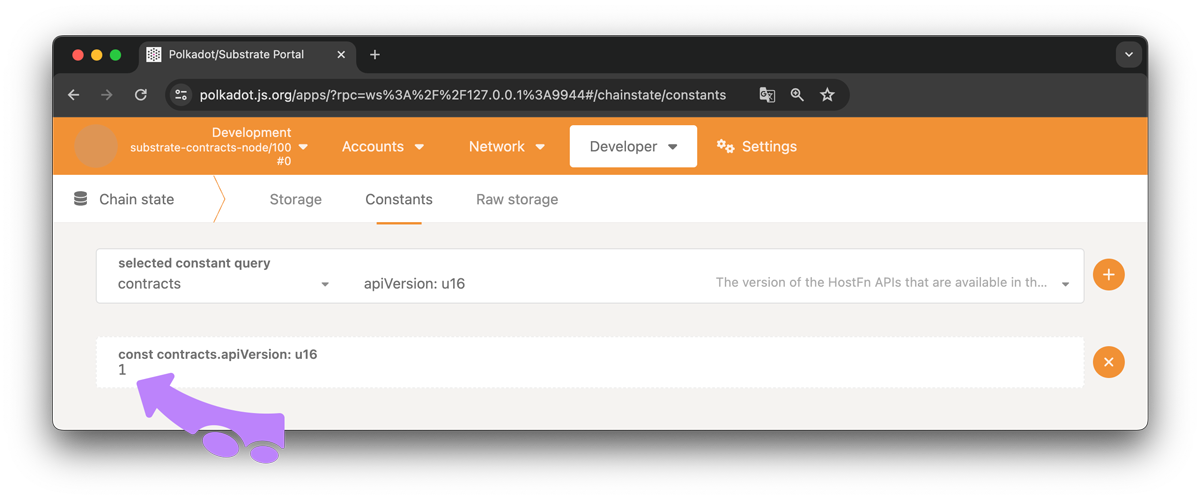
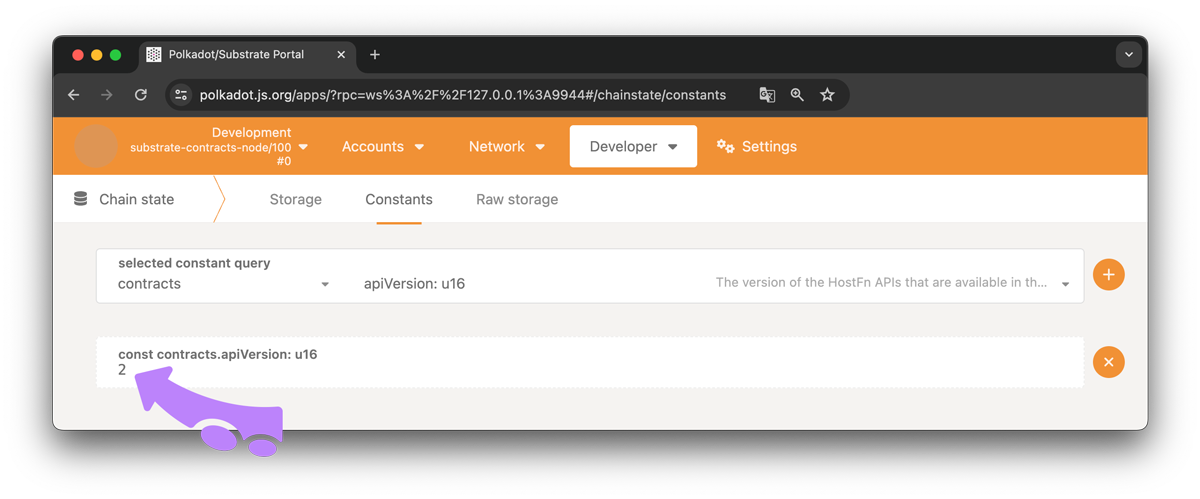
You can find out if a chain supports these new functions by
querying the `contracts::apiVersion` constant. It has to be `2`.
You can use the [polakdot.js app](https://polkadot.js.org/apps/) to do this:
Developer » Chain State » Constants » `contracts` » `apiVersion` » Click on the `+` on the right.
### Alternative off-chain E2E testing backend support: DRink!
DRink! is a toolbox for ink! developers that allows for testing your contracts
without any running node.
It has a number of features that are pretty great:
- deploy and call your contracts synchronously, _without any delays_ related to block production or networking.
- enhanced debugging and call tracing.
- supports _arbitrary runtime_ configurations, including custom chain extensions and runtime calls.
- full control over runtime state, including block number, timestamp, etc.
See the [DRink!](https://github.com/inkdevhub/drink) page for more details.
### Contract Verification
We added a bunch of helpful documentation and `cargo-contract` commands for
contract verification. Please see the page on contract verification under "Basics"
for more details.
### We improved the contract example illustrating upgradeable contracts via `delegate_call`
See [here](https://github.com/use-ink/ink-examples/tree/main/upgradeable-contracts)
for the contract example.
### Upgradeable Contracts: `delegate_dependency`
We've added support for two new host functions:
- `lock_delegate_dependency`: prevents the code at the given code hash from being removed.
- `unlock_delegate_dependency`: releases the lock on preventing the code from being removed
from the current contract.
Having a delegate dependency allows contracts to safely delegate to another `code_hash` with
the guarantee that it cannot be deleted.
We've updated the [`upgradeable-contracts/delegator`](https://github.com/use-ink/ink-examples/tree/main/upgradeable-contracts#delegator)
example to demonstrate these new calls.
For that purpose we've also added a [`remove_code`](https://docs.rs/ink_e2e/5.0.0/ink_e2e/trait.ContractsBackend.html#method.remove_code)
function to the E2E API.
These two functions are only available from `polkadot-1.8.0` on.
You can find out if a chain supports these new functions by
querying the `contracts::apiVersion` constant. It has to be `2`.
You can use the [polakdot.js app](https://polkadot.js.org/apps/) to do this:
Developer » Chain State » Constants » `contracts` » `apiVersion` » Click on the `+` on the right.
 At the time of the ink! v5 release (March 2024) no parachain with ink! support
had upgraded to `polkadot-v1.8.0` yet.
### We made `set_code_hash` generic
The `self.env().set_code_hash()` method now accepts the `Hash` environment type instead
of a concrete `[u8; 32]`.
```rust
// Previously
pub fn set_code(&mut self, code_hash: [u8; 32]) {
ink::env::set_code_hash(&code_hash).unwrap_or_else(|err| {});
}
// Now
pub fn set_code(&mut self, code_hash: Hash) {
self.env().set_code_hash(&code_hash).unwrap_or_else(|err| {});
}
```
More details in [#1906](https://github.com/use-ink/ink/pull/1906).
### Buffer size can be customized
With [#1869](https://github.com/use-ink/ink/pull/1869) we added a possibility
of setting a custom static buffer size for ink! to use.
ink! uses a static buffer for interacting with pallet-contracts, i.e. to move data
between `pallet-contracts` and a smart contract. The advantage of a static buffer
is that no gas-expensive heap allocations are necessary, all allocations are done
using simple pointer arithmetic.
The default static buffer size is 16 kB, which is enough for on-chain smart
contracts. However, the [Phala Network](https://phala.network/) parachain on Polkadot
allows the deployment of ink! contracts off-chain. Hence, for their chain certain high
computation contracts might require a larger buffer size.
### Stabilized `call_runtime`
We stabilized `call_runtime` in [#1749](https://github.com/use-ink/ink/pull/1749).
It can be used to call a runtime dispatchable from an ink! contract.
You can find a contract example and a comparison with chain extensions
[here](https://github.com/use-ink/ink-examples/tree/main/call-runtime).
We've added an example of how to end-to-end test
`call_runtime` [here](https://github.com/use-ink/ink-examples/tree/main/e2e-call-runtime).
````
## File: docs/faq/migrating-from-ink-5-to-6.md
````markdown
---
title: "Migration: ink! v5 → v6"
slug: /faq/migrating-from-ink-5-to-6
---
import useBaseUrl from '@docusaurus/useBaseUrl';
At the time of the ink! v5 release (March 2024) no parachain with ink! support
had upgraded to `polkadot-v1.8.0` yet.
### We made `set_code_hash` generic
The `self.env().set_code_hash()` method now accepts the `Hash` environment type instead
of a concrete `[u8; 32]`.
```rust
// Previously
pub fn set_code(&mut self, code_hash: [u8; 32]) {
ink::env::set_code_hash(&code_hash).unwrap_or_else(|err| {});
}
// Now
pub fn set_code(&mut self, code_hash: Hash) {
self.env().set_code_hash(&code_hash).unwrap_or_else(|err| {});
}
```
More details in [#1906](https://github.com/use-ink/ink/pull/1906).
### Buffer size can be customized
With [#1869](https://github.com/use-ink/ink/pull/1869) we added a possibility
of setting a custom static buffer size for ink! to use.
ink! uses a static buffer for interacting with pallet-contracts, i.e. to move data
between `pallet-contracts` and a smart contract. The advantage of a static buffer
is that no gas-expensive heap allocations are necessary, all allocations are done
using simple pointer arithmetic.
The default static buffer size is 16 kB, which is enough for on-chain smart
contracts. However, the [Phala Network](https://phala.network/) parachain on Polkadot
allows the deployment of ink! contracts off-chain. Hence, for their chain certain high
computation contracts might require a larger buffer size.
### Stabilized `call_runtime`
We stabilized `call_runtime` in [#1749](https://github.com/use-ink/ink/pull/1749).
It can be used to call a runtime dispatchable from an ink! contract.
You can find a contract example and a comparison with chain extensions
[here](https://github.com/use-ink/ink-examples/tree/main/call-runtime).
We've added an example of how to end-to-end test
`call_runtime` [here](https://github.com/use-ink/ink-examples/tree/main/e2e-call-runtime).
````
## File: docs/faq/migrating-from-ink-5-to-6.md
````markdown
---
title: "Migration: ink! v5 → v6"
slug: /faq/migrating-from-ink-5-to-6
---
import useBaseUrl from '@docusaurus/useBaseUrl';
} "Migration 5.x To 6.0 Title Picture") We've made a number of breaking changes from ink! 5.x to ink! 6.0.
On this page we outline how you can migrate existing dApps and
contracts.
The biggest change is that we've migrated from `pallet-contracts` +
WebAssembly (executed in `wasmi`) to [`pallet-revive`](https://github.com/paritytech/polkadot-sdk/tree/master/substrate/frame/revive) +
RISC-V (executed in [PolkaVM](https://github.com/paritytech/polkavm/)).
_This is a major breaking change, ink! v6 is only compatible with `cargo-contract` >= v6
and chains that include `pallet-revive`._
We did a detailed write-up of the background to this development and the reasoning
[here](https://r0gue.medium.com/ink-project-state-q1-25-08441f4ac5d2).
You can find the full changelog of the 6.0 release [here](https://github.com/use-ink/ink/blob/master/CHANGELOG.md#version-600).
:::caution
This migration guide only considers your code base! Not your storage data!
If you have an existing contract on-chain you might not be able to just
upgrade the code on-chain, you possibly also have to migrate your storage data.
:::
## Compatibility
- **`polkadot-sdk`**: [`polkadot-sdk/cbab8ed4be1941420dd25dc81102fb79d8e2a7f0`](https://github.com/paritytech/polkadot-sdk/commit/cbab8ed4be1941420dd25dc81102fb79d8e2a7f0) (Oct 15, 2025)
- For the latest compatibility requirements of Rust, `cargo-contract` and the `ink-node`, see the [setup instructions](/docs/v6/getting-started/setup).
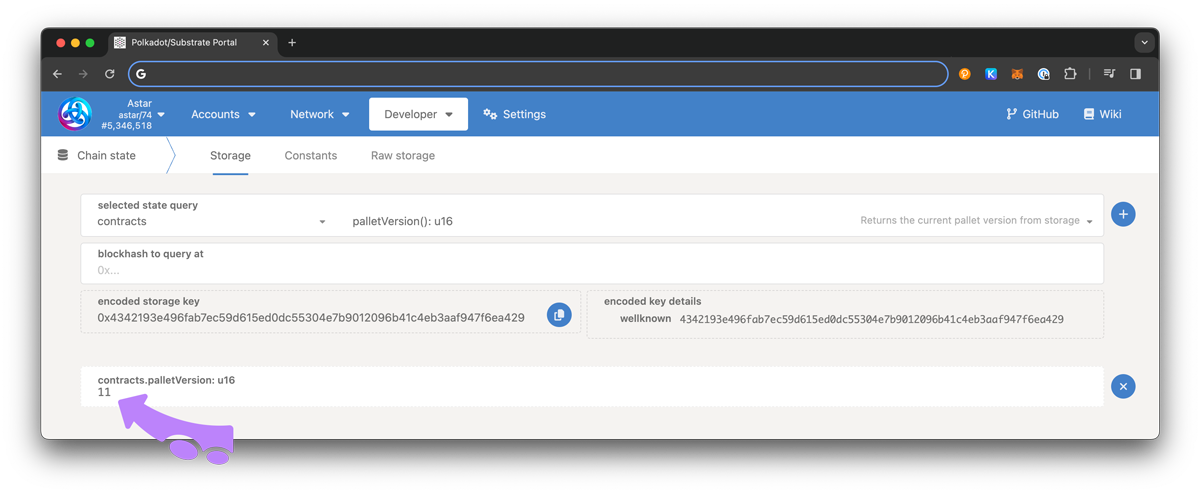
### How do I find out if a chain is compatible with ink! 6.0?
You can query `contracts::palletVersion()` via the chain state RPCs. It has to
be `>= 9` for ink! 5.0 to be compatible, if you don't use any of the four functions
mentioned above.
For the above mentioned four functions please see the respective sections on this page,
there we explain how to find out if a chain supports them there.
You can use the [polkadot.js app](https://polkadot.js.org/apps/) to connect to the chain and check if
`reviveApi` is available under Developer » Runtime calls.
We've made a number of breaking changes from ink! 5.x to ink! 6.0.
On this page we outline how you can migrate existing dApps and
contracts.
The biggest change is that we've migrated from `pallet-contracts` +
WebAssembly (executed in `wasmi`) to [`pallet-revive`](https://github.com/paritytech/polkadot-sdk/tree/master/substrate/frame/revive) +
RISC-V (executed in [PolkaVM](https://github.com/paritytech/polkavm/)).
_This is a major breaking change, ink! v6 is only compatible with `cargo-contract` >= v6
and chains that include `pallet-revive`._
We did a detailed write-up of the background to this development and the reasoning
[here](https://r0gue.medium.com/ink-project-state-q1-25-08441f4ac5d2).
You can find the full changelog of the 6.0 release [here](https://github.com/use-ink/ink/blob/master/CHANGELOG.md#version-600).
:::caution
This migration guide only considers your code base! Not your storage data!
If you have an existing contract on-chain you might not be able to just
upgrade the code on-chain, you possibly also have to migrate your storage data.
:::
## Compatibility
- **`polkadot-sdk`**: [`polkadot-sdk/cbab8ed4be1941420dd25dc81102fb79d8e2a7f0`](https://github.com/paritytech/polkadot-sdk/commit/cbab8ed4be1941420dd25dc81102fb79d8e2a7f0) (Oct 15, 2025)
- For the latest compatibility requirements of Rust, `cargo-contract` and the `ink-node`, see the [setup instructions](/docs/v6/getting-started/setup).
### How do I find out if a chain is compatible with ink! 6.0?
You can query `contracts::palletVersion()` via the chain state RPCs. It has to
be `>= 9` for ink! 5.0 to be compatible, if you don't use any of the four functions
mentioned above.
For the above mentioned four functions please see the respective sections on this page,
there we explain how to find out if a chain supports them there.
You can use the [polkadot.js app](https://polkadot.js.org/apps/) to connect to the chain and check if
`reviveApi` is available under Developer » Runtime calls.
}) The following chains are in production and support ink! 6.0.
The following chains are in production and support ink! 6.0.
})
})
})
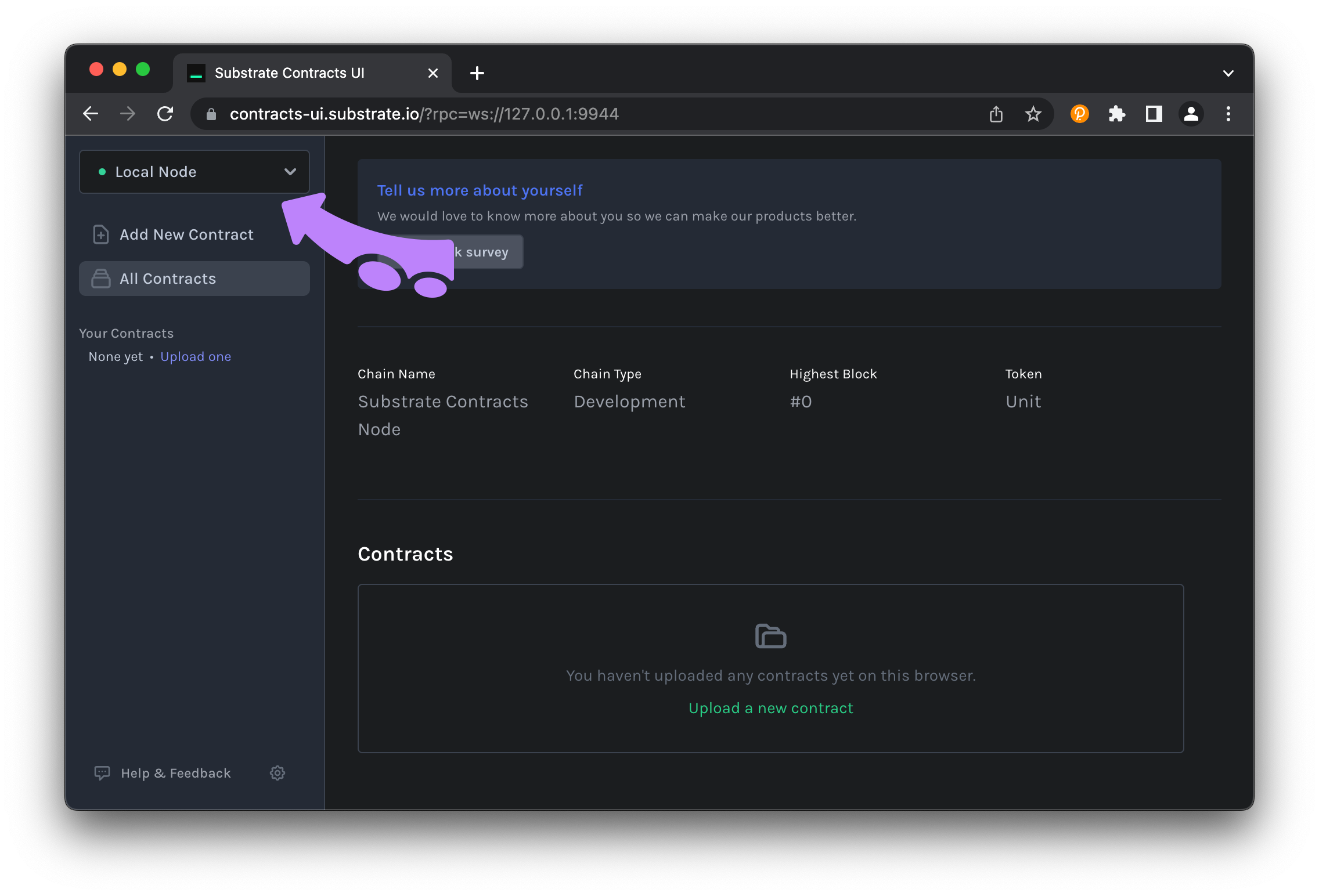
} "Screenshot of terminal starting a local node") You can interact with your node using `cargo-contract`, `pop` or [the Contracts UI](https://ui.use.ink/). If you use the Contracts UI, you have to configure it to connect to the locally running node:
- Click on the dropdown selector at the top left corner.
- Choose "Local Node".
# Set up a Local Polkadot Hub Environment
You can easily launch a full Polkadot Hub setup locally using the [Pop CLI](https://learn.onpop.io/contracts/guides/deploy). This includes a local relay chain and one or more system parachains, allowing for end-to-end smart contract development and testing.
To spin up the environment with the Paseo relay chain and system chains like `asset-hub` and `passet-hub`, run:
```bash
pop up paseo -p asset-hub,passet-hub
```
This command will launch:
- A local Paseo relay chain
- [Passet Hub](../intro/where-to-deploy.md#passet-hub) as a parachain, connected and ready to deploy smart contracts
You can also include additional system parachains in your local environment, such as `people` and `pop`, by extending the command:
```bash
pop up paseo -p asset-hub,passet-hub,people,pop
```
Need more options or configuration details? Check out the CLI help:
```bash
pop up paseo --help
```
## Deploy the contract
Now that we have generated the contract binary from our source code and connected to a local node, we want to deploy this contract onto our local node.
Smart contract deployment on Polkadot is a little different than on traditional smart contract blockchains.
For example, the standard ERC20 token has been deployed to Ethereum thousands of times, sometimes only with changes to the initial configuration (through the Solidity `constructor` function). Each of these instances take up space on the blockchain equivalent to the contract source code size, even though no code was actually changed.
The contract deployment process in Polkadot is split into two steps:
1. Putting your contract code on the blockchain
2. Creating an instance of your contract
With this pattern, contract code like the ERC20 standard can be put on the blockchain one single time, but instantiated any number of times. No need to continually upload the same source code over and waste space on the blockchain.
## Using the Terminal
With `cargo-contract` or `pop` it's just a simple sequence of:
You can interact with your node using `cargo-contract`, `pop` or [the Contracts UI](https://ui.use.ink/). If you use the Contracts UI, you have to configure it to connect to the locally running node:
- Click on the dropdown selector at the top left corner.
- Choose "Local Node".

# Set up a Local Polkadot Hub Environment
You can easily launch a full Polkadot Hub setup locally using the [Pop CLI](https://learn.onpop.io/contracts/guides/deploy). This includes a local relay chain and one or more system parachains, allowing for end-to-end smart contract development and testing.
To spin up the environment with the Paseo relay chain and system chains like `asset-hub` and `passet-hub`, run:
```bash
pop up paseo -p asset-hub,passet-hub
```
This command will launch:
- A local Paseo relay chain
- [Passet Hub](../intro/where-to-deploy.md#passet-hub) as a parachain, connected and ready to deploy smart contracts
You can also include additional system parachains in your local environment, such as `people` and `pop`, by extending the command:
```bash
pop up paseo -p asset-hub,passet-hub,people,pop
```
Need more options or configuration details? Check out the CLI help:
```bash
pop up paseo --help
```
## Deploy the contract
Now that we have generated the contract binary from our source code and connected to a local node, we want to deploy this contract onto our local node.
Smart contract deployment on Polkadot is a little different than on traditional smart contract blockchains.
For example, the standard ERC20 token has been deployed to Ethereum thousands of times, sometimes only with changes to the initial configuration (through the Solidity `constructor` function). Each of these instances take up space on the blockchain equivalent to the contract source code size, even though no code was actually changed.
The contract deployment process in Polkadot is split into two steps:
1. Putting your contract code on the blockchain
2. Creating an instance of your contract
With this pattern, contract code like the ERC20 standard can be put on the blockchain one single time, but instantiated any number of times. No need to continually upload the same source code over and waste space on the blockchain.
## Using the Terminal
With `cargo-contract` or `pop` it's just a simple sequence of:
 ## What is ink!?
ink! is a programming language for writing smart contracts that combines the power and safety of Rust with blockchain development.
Here's what makes ink! special:
**Built on Rust**: ink! takes the popular Rust programming language and adds everything you need for smart contract development. You get all of Rust's safety features like memory safety and type safety, plus access to the vast Rust ecosystem.
**Smart Contract Ready**: While ink! uses Rust as its foundation, it's specifically designed for smart contracts. This means:
- Special annotations and macros are provided for smart contract needs
- Built-in support for storage, events, and contract interactions
**Simple but Powerful**: ink! uses special `#[ink(...)]` attribute macros to turn your Rust code into smart contracts. These macros tell ink! what different parts of your code represent; like storage, functions that can be called, or events that can be emitted.
**Compile to RISC-V**: Your ink! contracts compile to RISC-V bytecode that runs efficiently on blockchains, giving you both performance and compatibility.
## What can you do with it?
ink! opens up a world of possibilities for blockchain development across the Polkadot ecosystem:
### Build Smart Contracts for Polkadot Blockchains
With ink!, you can write smart contracts that run on any blockchain built with the Polkadot SDK that includes the `pallet-revive` module. This includes many parachains and standalone chains in the Polkadot ecosystem.
- **DeFi Applications**: Build decentralized exchanges, lending protocols, and other financial applications
- **NFT Platforms**: Create marketplaces, games, and digital collectible platforms
- **Cross-Chain Applications**: Take advantage of Polkadot's interoperability to build applications that work across multiple blockchains
- **Utility Contracts**: From simple storage contracts to complex business logic, ink! can handle it all
### Flexible Development Paths
ink! provides different approaches depending on your needs:
- **Prototype Quickly**: Start with a smart contract to test your idea and get user feedback
- **Enhanced Chain Features**: Use precompiles to access special blockchain functionality beyond basic smart contracts
- **Scale to Parachains**: Later migrate successful contracts to dedicated parachains for better performance and lower costs
### Composability
One of ink!'s unique advantages is its compatibility with Solidity. This means:
- Solidity developers can call ink! contracts seamlessly
- You can use existing Ethereum tools and frameworks
- Easy migration between different blockchain ecosystems
Want to learn more about ink!'s relationship with the Polkadot ecosystem and its various use cases? Check out our detailed guide on [Polkadot SDK and ink!](../background/polkadot-sdk.md).
Ready to get started? Head to our [Getting Started](../getting-started/setup.md) guide to begin building your first ink! smart contract.
````
## File: docs/intro/overview.md
````markdown
---
title: Overview
hide_title: true
slug: /overview
---
import useBaseUrl from '@docusaurus/useBaseUrl';
Welcome to the ink! documentation, the Rust-based smart contract language for the Polkadot ecosystem. This documentation will take you from your first "Hello, World!" contract to building sophisticated decentralized applications.
## Overview
### **[Getting Started](../getting-started/creating.md)**
Begin your ink! journey with setup instructions, creating your first contract, and deploying it to a blockchain. Perfect for newcomers to both ink! and smart contract development.
### **[Basics](../basics/contract-template.md)**
Master the fundamental concepts of ink! development including storage, contract interactions, events, and the ABI system that enables interoperability with other languages like Solidity.
### **[Testing](../testing/overview.md)**
Learn comprehensive testing strategies from unit tests to end-to-end testing, including working with testing tools like DRink! for robust contract development.
### **[Debugging](../debugging/overview.md)**
Discover tools and techniques for debugging your contracts, from event logging to tracing execution and using development tools.
### **[Macros & Attributes](../macros-attributes/overview.md)**
Deep dive into ink!'s powerful macro system that transforms your Rust code into smart contracts, including storage annotations, message definitions, and event handling.
### **[Storage & Data Structures](../datastructures/overview.md)**
Understand how to efficiently store and manage data in your contracts, from simple values to complex mappings and custom data structures.
### **[Linter](../linter/overview.md)**
Utilize ink!'s built-in security linter to identify common smart contract vulnerabilities and ensure your code follows best practices.
### **[Integrations and SDKs](../integrations-and-sdks/overview.md)**
Connect your contracts to web applications using TypeScript/JavaScript libraries, React hooks, Solidity Tooling, and various SDK options for building complete dApps.
### **[Technical Background](../background/polkadot-sdk.md)**
Understand the deeper technical aspects including why Rust and RISC-V were chosen, how ink! compares to other smart contract languages, and when to choose smart contracts vs. parachains.
````
## File: docs/intro/sub0-hackathon.mdx
````
---
title: sub0 Hackathon 2025
hide_title: true
slug: /sub0-hackathon-2025
hide_table_of_contents: true
---
import useBaseUrl from '@docusaurus/useBaseUrl';
## What is ink!?
ink! is a programming language for writing smart contracts that combines the power and safety of Rust with blockchain development.
Here's what makes ink! special:
**Built on Rust**: ink! takes the popular Rust programming language and adds everything you need for smart contract development. You get all of Rust's safety features like memory safety and type safety, plus access to the vast Rust ecosystem.
**Smart Contract Ready**: While ink! uses Rust as its foundation, it's specifically designed for smart contracts. This means:
- Special annotations and macros are provided for smart contract needs
- Built-in support for storage, events, and contract interactions
**Simple but Powerful**: ink! uses special `#[ink(...)]` attribute macros to turn your Rust code into smart contracts. These macros tell ink! what different parts of your code represent; like storage, functions that can be called, or events that can be emitted.
**Compile to RISC-V**: Your ink! contracts compile to RISC-V bytecode that runs efficiently on blockchains, giving you both performance and compatibility.
## What can you do with it?
ink! opens up a world of possibilities for blockchain development across the Polkadot ecosystem:
### Build Smart Contracts for Polkadot Blockchains
With ink!, you can write smart contracts that run on any blockchain built with the Polkadot SDK that includes the `pallet-revive` module. This includes many parachains and standalone chains in the Polkadot ecosystem.
- **DeFi Applications**: Build decentralized exchanges, lending protocols, and other financial applications
- **NFT Platforms**: Create marketplaces, games, and digital collectible platforms
- **Cross-Chain Applications**: Take advantage of Polkadot's interoperability to build applications that work across multiple blockchains
- **Utility Contracts**: From simple storage contracts to complex business logic, ink! can handle it all
### Flexible Development Paths
ink! provides different approaches depending on your needs:
- **Prototype Quickly**: Start with a smart contract to test your idea and get user feedback
- **Enhanced Chain Features**: Use precompiles to access special blockchain functionality beyond basic smart contracts
- **Scale to Parachains**: Later migrate successful contracts to dedicated parachains for better performance and lower costs
### Composability
One of ink!'s unique advantages is its compatibility with Solidity. This means:
- Solidity developers can call ink! contracts seamlessly
- You can use existing Ethereum tools and frameworks
- Easy migration between different blockchain ecosystems
Want to learn more about ink!'s relationship with the Polkadot ecosystem and its various use cases? Check out our detailed guide on [Polkadot SDK and ink!](../background/polkadot-sdk.md).
Ready to get started? Head to our [Getting Started](../getting-started/setup.md) guide to begin building your first ink! smart contract.
````
## File: docs/intro/overview.md
````markdown
---
title: Overview
hide_title: true
slug: /overview
---
import useBaseUrl from '@docusaurus/useBaseUrl';
Welcome to the ink! documentation, the Rust-based smart contract language for the Polkadot ecosystem. This documentation will take you from your first "Hello, World!" contract to building sophisticated decentralized applications.
## Overview
### **[Getting Started](../getting-started/creating.md)**
Begin your ink! journey with setup instructions, creating your first contract, and deploying it to a blockchain. Perfect for newcomers to both ink! and smart contract development.
### **[Basics](../basics/contract-template.md)**
Master the fundamental concepts of ink! development including storage, contract interactions, events, and the ABI system that enables interoperability with other languages like Solidity.
### **[Testing](../testing/overview.md)**
Learn comprehensive testing strategies from unit tests to end-to-end testing, including working with testing tools like DRink! for robust contract development.
### **[Debugging](../debugging/overview.md)**
Discover tools and techniques for debugging your contracts, from event logging to tracing execution and using development tools.
### **[Macros & Attributes](../macros-attributes/overview.md)**
Deep dive into ink!'s powerful macro system that transforms your Rust code into smart contracts, including storage annotations, message definitions, and event handling.
### **[Storage & Data Structures](../datastructures/overview.md)**
Understand how to efficiently store and manage data in your contracts, from simple values to complex mappings and custom data structures.
### **[Linter](../linter/overview.md)**
Utilize ink!'s built-in security linter to identify common smart contract vulnerabilities and ensure your code follows best practices.
### **[Integrations and SDKs](../integrations-and-sdks/overview.md)**
Connect your contracts to web applications using TypeScript/JavaScript libraries, React hooks, Solidity Tooling, and various SDK options for building complete dApps.
### **[Technical Background](../background/polkadot-sdk.md)**
Understand the deeper technical aspects including why Rust and RISC-V were chosen, how ink! compares to other smart contract languages, and when to choose smart contracts vs. parachains.
````
## File: docs/intro/sub0-hackathon.mdx
````
---
title: sub0 Hackathon 2025
hide_title: true
slug: /sub0-hackathon-2025
hide_table_of_contents: true
---
import useBaseUrl from '@docusaurus/useBaseUrl';
} "The ink! 6.0 smart contracts toolkit release") # Welcome _sub0 Hackathon_ participants!
This page contains all necessary info to participate in the [sub0 HACK](https://luma.com/sub0hack) using ink! v6.
* The hackathon takes place from Nov 14 - Nov 16, 2025.
* $50,000 in prize money.
* Remote participation is fine!
## 🚑 Support
# Welcome _sub0 Hackathon_ participants!
This page contains all necessary info to participate in the [sub0 HACK](https://luma.com/sub0hack) using ink! v6.
* The hackathon takes place from Nov 14 - Nov 16, 2025.
* $50,000 in prize money.
* Remote participation is fine!
## 🚑 Support
 If you don't use Telegram, please create a GitHub issue [here](https://github.com/use-ink/ink/issues).
## 🤖 LLMs
We have an [`llms.txt`](https://use.ink/llms.txt) that contains
all documentation from this website. If you copy/paste it into your
prompt/context window, this will help your AI friend a lot to provide help.
## 🚀 Fast Track
Install Rust (>= 1.88) and `cargo`: [Installation Guide](https://doc.rust-lang.org/cargo/getting-started/installation.html).
Download the binary for a local development node [here](https://github.com/use-ink/ink-node/releases).
```toml
# Install our cli tool: `cargo-contract`.
# It wraps around Rust's `cargo build` to build contracts with optimal
# flags for blockchains. It also allows for deploying + interacting
# with contracts.
$ rustup component add rust-src
$ cargo install --locked --force --version 6.0.0-beta cargo-contract
# Create a simple contract.
$ cargo contract new flipper && cd flipper
$ cargo contract build --release
# Download our local development node.
# Find the binary here: https://github.com/use-ink/ink-node/releases/latest
# Start your local development node in a separate shell session
$ ink-node
# Instantiate your contract on-chain.
$ cargo contract instantiate --suri //Alice
# Dry-run a call of it.
$ cargo contract call --suri //Alice --contract 0x… --message get
# Execute a contract call, as a transaction on-chain.
$ cargo contract call --suri //Alice --contract 0x… --message flip -x
```
If you don't use Telegram, please create a GitHub issue [here](https://github.com/use-ink/ink/issues).
## 🤖 LLMs
We have an [`llms.txt`](https://use.ink/llms.txt) that contains
all documentation from this website. If you copy/paste it into your
prompt/context window, this will help your AI friend a lot to provide help.
## 🚀 Fast Track
Install Rust (>= 1.88) and `cargo`: [Installation Guide](https://doc.rust-lang.org/cargo/getting-started/installation.html).
Download the binary for a local development node [here](https://github.com/use-ink/ink-node/releases).
```toml
# Install our cli tool: `cargo-contract`.
# It wraps around Rust's `cargo build` to build contracts with optimal
# flags for blockchains. It also allows for deploying + interacting
# with contracts.
$ rustup component add rust-src
$ cargo install --locked --force --version 6.0.0-beta cargo-contract
# Create a simple contract.
$ cargo contract new flipper && cd flipper
$ cargo contract build --release
# Download our local development node.
# Find the binary here: https://github.com/use-ink/ink-node/releases/latest
# Start your local development node in a separate shell session
$ ink-node
# Instantiate your contract on-chain.
$ cargo contract instantiate --suri //Alice
# Dry-run a call of it.
$ cargo contract call --suri //Alice --contract 0x… --message get
# Execute a contract call, as a transaction on-chain.
$ cargo contract call --suri //Alice --contract 0x… --message flip -x
```
Please see the chapter [Getting started](../getting-started/setup.md) of this documentation for a deeper introduction. ## You need to use ink! v6.0.0-beta! Prior releases of ink! are not supported for the hackathon! You won't be able to deploy them on Passet Hub. Make sure your `Cargo.toml` contains ```toml [dependencies] ink = { version = "6.0.0-beta" } [dev-dependencies] ink_e2e = { version = "6.0.0-beta" } # we moved the sandbox testing environment to a separate crate # this one cannot be published to crates.io yet ink_sandbox = { git = "https://github.com/use-ink/ink.git", branch = "6.0.0-beta" } ``` Your `cargo-contract` version must be `6.0.0-beta` too: ```bash cargo install --force --locked --version 6.0.0-beta cargo-contract ``` ## 🚀 Where to deploy? You can deploy locally via our local development node [`ink-node`](https://github.com/use-ink/ink-node/releases). As a testnet you need to use [Paseo Passet Hub](https://use.ink/docs/v6/where-to-deploy/#passet-hub). You can find the faucet [here](https://faucet.polkadot.io/?parachain=1111). ## 🏰 dApp Templates We recommend using [ink!athon](https://inkathon.xyz/) to generate dApp templates that contain contract and frontend code. You can find a hardcoded frontend for our `flipper` example [here](https://github.com/use-ink/ink-examples/tree/main/flipper). ## 🤔 Smart Contract Examples You can find many contract examples in our `ink-examples` repository.
})
Our "Hello, World!".
» view example
})
An ERC-20 implementation.
» view example
})
})
An upgradeable contract.
» view example
})
A multi-signature wallet.
» view example
})
Calling Solidity contracts.
» view example
Our "Hello, World!".
» view example
An ERC-20 implementation.
» view example
An upgradeable contract.
» view example
A multi-signature wallet.
» view example
})
Allow runtime access.
» view example
})
}) You can deploy your contract with PAS token on [Pop's Testnet](https://learn.onpop.io/contracts/tutorials/your-first-ink-smart-contract). See [Pop's guide to getting tokens](https://learn.onpop.io/contracts/guides/bridge-tokens-to-pop-network).
````
## File: docs/testing/testnet/Faucet.tsx
````typescript
import React, { useMemo, useState } from 'react'
import ReCAPTCHA from 'react-google-recaptcha'
const RECAPTCHA_SITE_KEY = '6LcgFI4nAAAAAATrEMoJ6zBacsx5udc1UhGFXemH'
const FAUCET_URL = 'https://rococo-faucet.parity-testnet.parity.io/drip/web'
const Faucet = () => {
const [captcha, setCaptcha] = useState
You can deploy your contract with PAS token on [Pop's Testnet](https://learn.onpop.io/contracts/tutorials/your-first-ink-smart-contract). See [Pop's guide to getting tokens](https://learn.onpop.io/contracts/guides/bridge-tokens-to-pop-network).
````
## File: docs/testing/testnet/Faucet.tsx
````typescript
import React, { useMemo, useState } from 'react'
import ReCAPTCHA from 'react-google-recaptcha'
const RECAPTCHA_SITE_KEY = '6LcgFI4nAAAAAATrEMoJ6zBacsx5udc1UhGFXemH'
const FAUCET_URL = 'https://rococo-faucet.parity-testnet.parity.io/drip/web'
const Faucet = () => {
const [captcha, setCaptcha] = useStateGet Testnet Tokens



{error}
}
### (3) Deploy Your Contract
Once you have `PAS` on Paseo you can [bridge them from Paseo to Pop](https://learn.onpop.io/contracts/guides/bridge-tokens-to-pop-network) and deploy by following the instructions in the Pop Docs [here](https://learn.onpop.io/contracts/guides/deploy#deploy-to-custom-or-public-network).
````
## File: docs/testing/e2e.md
````markdown
---
title: "Full E2E"
hide_title: true
slug: /contract-testing/end-to-end-e2e-testing
---
import Tabs from '@theme/Tabs';
import TabItem from '@theme/TabItem';

# End-to-End (E2E) Tests
E2E testing enables developers to write a test that will not only test the contract in an
isolated manner; instead the contract will be tested _together_ with all components that
will be involved on-chain – so from end to end. This way of testing resembles closely
how the contract will actually behave in production.
As part of the test, the contract will be compiled and deployed to a Polkadot SDK node that
is running in the background. ink! offers API functions that enable developers to then
interact with the contract via transactions that they create and submit to the blockchain.
You as a developer can define assertions on the outcome of their transactions, such as checking
for state mutations, transaction failures or incurred gas costs.
Your chain configuration will be tested together with the smart contract. And if your
chain has pallets that are involved with the smart contract execution, those will be
part of the test execution as well.
ink! does not put any requirements on the Polkadot SDK node in the background – for example,
you can run a node that contains a snapshot of a live network.
## Example
The following code example illustrates a basic E2E test for the
[flipper example](https://github.com/use-ink/ink-examples/blob/main/flipper/lib.rs).
```rust
#[ink_e2e::test]
async fn default_works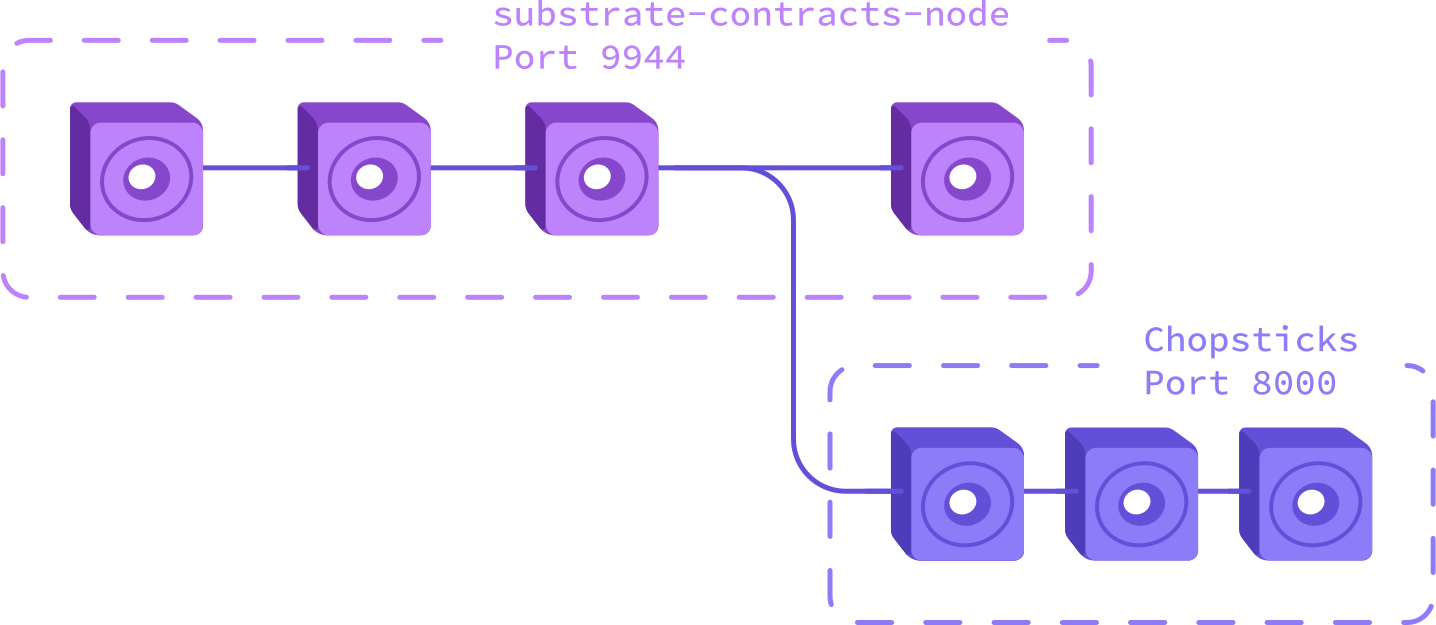 Clone chopsticks:
```
git clone https://github.com/AcalaNetwork/chopsticks
```
Modify the `dev.yml` config file in the cloned repository (or create one from scratch) :
```
endpoint: ws://127.0.0.1:9944
mock-signature-host: true
block: 1
db: ./db.sqlite
```
:::info
In the example above chopsticks will be mirroring up until block 1 from the
`ink-node`.
For production chains (like Aleph Zero or Astar) you would want to use a different
block number and different endpoint. The Chopsticks repository already contains a
wide number of configurations for ink! production chains (see [here](https://github.com/AcalaNetwork/chopsticks/tree/master/configs)).
If you don't find a fitting configuration there, see the section
"[Application to Production Chains](#application-to-production-chains)".
:::
You can either run chopsticks locally by following the instructions
[here](https://github.com/AcalaNetwork/chopsticks#install), or
you can run it using npx:
```
npx @acala-network/chopsticks@latest --config=configs/dev.yml
```
You should get output similar to:
```
npx @acala-network/chopsticks@latest --config=configs/dev.yml
[08:22:31.231] INFO (rpc/3037748): Development RPC listening on port 8000
```
The Chopsticks node is running on port 8000.
If you now execute the `cargo-contract` storage command against this node, you'll see
that the `flipper` contract exists there as well:
```
cargo contract storage --contract 5FgRdaReCLFtwbzYiVd2hoz9P3oERdNy2njnFmUBHu4FYg7s --url=ws://localhost:8000
+-------+----------+--------+-------------------------+
| Index | Root Key | Parent | Value |
+=====================================================+
| 0 | 00000000 | root | Flipper { value: true } |
+-------+----------+--------+-------------------------+
```
Chopsticks has branched off from the live chain.
You can now submit transactions to the Chopsticks node on port 8000,
without affecting the node/chain on port 9944.
### Run ink! E2E Tests
Recap: We have our "live" `ink-node` running on port 9944
and our test node with the branched state running on port 8000.
Next we would like to run some tests against the contract on our forked chain.
Our `flipper/lib.rs` contains a test that illustrates how to do this.
The test reads an environment variable `CONTRACT_ADDR_HEX` that refers to
the `flipper` on-chain address.
Here's the code for it:
```rust
#[ink_e2e::test]
#[ignore]
async fn e2e_test_deployed_contract
Clone chopsticks:
```
git clone https://github.com/AcalaNetwork/chopsticks
```
Modify the `dev.yml` config file in the cloned repository (or create one from scratch) :
```
endpoint: ws://127.0.0.1:9944
mock-signature-host: true
block: 1
db: ./db.sqlite
```
:::info
In the example above chopsticks will be mirroring up until block 1 from the
`ink-node`.
For production chains (like Aleph Zero or Astar) you would want to use a different
block number and different endpoint. The Chopsticks repository already contains a
wide number of configurations for ink! production chains (see [here](https://github.com/AcalaNetwork/chopsticks/tree/master/configs)).
If you don't find a fitting configuration there, see the section
"[Application to Production Chains](#application-to-production-chains)".
:::
You can either run chopsticks locally by following the instructions
[here](https://github.com/AcalaNetwork/chopsticks#install), or
you can run it using npx:
```
npx @acala-network/chopsticks@latest --config=configs/dev.yml
```
You should get output similar to:
```
npx @acala-network/chopsticks@latest --config=configs/dev.yml
[08:22:31.231] INFO (rpc/3037748): Development RPC listening on port 8000
```
The Chopsticks node is running on port 8000.
If you now execute the `cargo-contract` storage command against this node, you'll see
that the `flipper` contract exists there as well:
```
cargo contract storage --contract 5FgRdaReCLFtwbzYiVd2hoz9P3oERdNy2njnFmUBHu4FYg7s --url=ws://localhost:8000
+-------+----------+--------+-------------------------+
| Index | Root Key | Parent | Value |
+=====================================================+
| 0 | 00000000 | root | Flipper { value: true } |
+-------+----------+--------+-------------------------+
```
Chopsticks has branched off from the live chain.
You can now submit transactions to the Chopsticks node on port 8000,
without affecting the node/chain on port 9944.
### Run ink! E2E Tests
Recap: We have our "live" `ink-node` running on port 9944
and our test node with the branched state running on port 8000.
Next we would like to run some tests against the contract on our forked chain.
Our `flipper/lib.rs` contains a test that illustrates how to do this.
The test reads an environment variable `CONTRACT_ADDR_HEX` that refers to
the `flipper` on-chain address.
Here's the code for it:
```rust
#[ink_e2e::test]
#[ignore]
async fn e2e_test_deployed_contract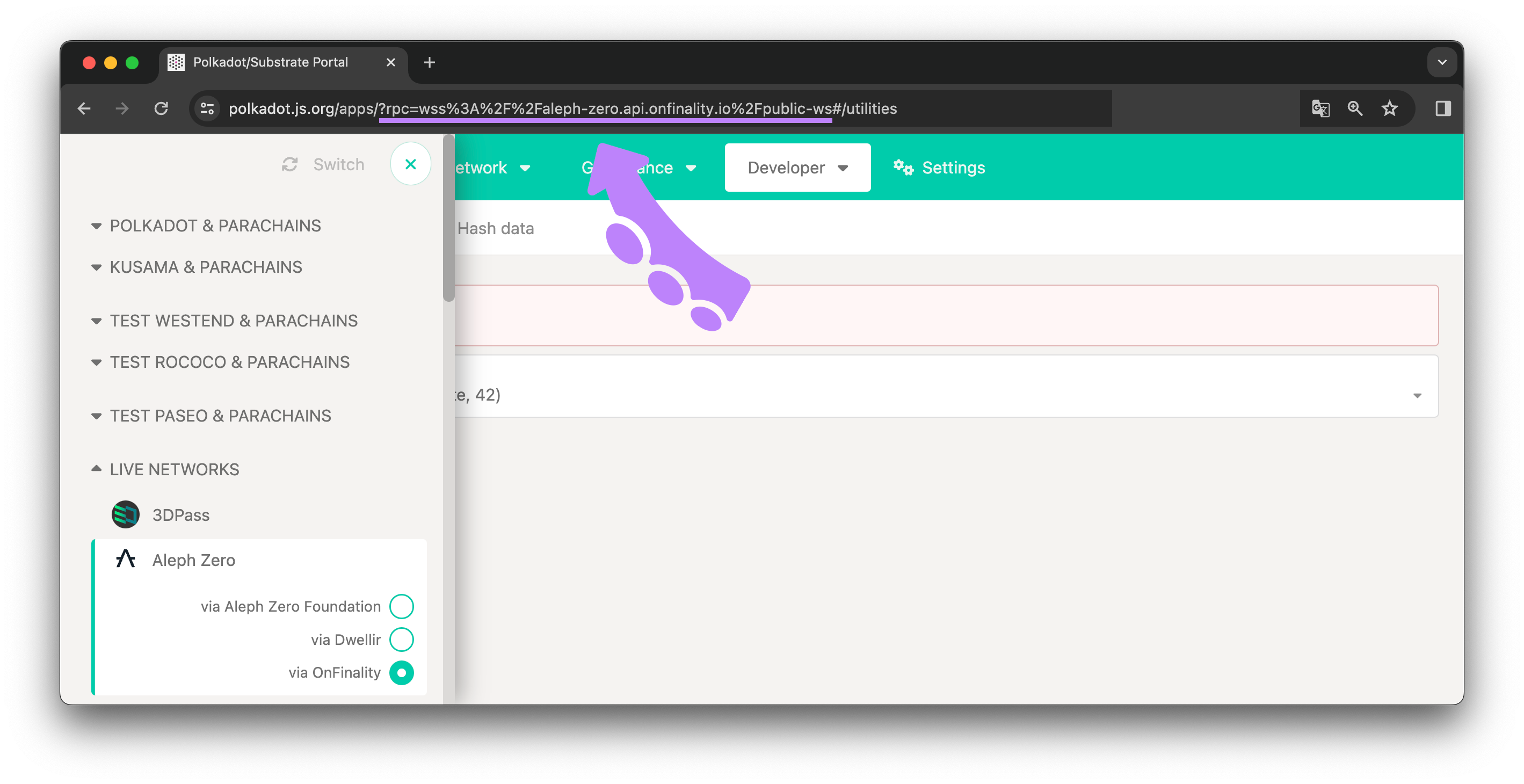 ````
## File: docs/testing/unit-integration.md
````markdown
---
title: Unit & Integration
hide_title: true
slug: /contract-testing/unit-integration-tests
---

# Tests
On this page we lay out the different use-cases for unit vs. integration tests.
## Unit Tests
Testing contracts off-chain is done by `cargo contract test` and users can simply use the standard Rust
routines of creating unit test modules within the ink! project:
```rust
#[cfg(test)]
mod tests {
use super::*;
#[test]
fn my_test() { ... }
}
```
Test instances of contracts can be created with something like:
```rust
let contract = MyContract::my_constructor(a, b);
```
Messages can simply be called on the returned instance as if `MyContract::my_constructor` returns a
`Self` instance.
See the [flipper example](https://github.com/use-ink/ink-examples/blob/main/flipper/lib.rs).
## Integration Tests
For integration tests, the test is annotated with our `#[ink::test]`
attribute instead of `#[test]`. This attribute denotes that
the test is then executed in a simulated, mocked blockchain environment.
Here functions are available to influence how the test environment
is configured (e.g. setting a specified balance of an account to
simulate how a contract would behave when interacting with it).
If you annotate a test with the `#[ink::test]` attribute it
will be executed in a simulated environment, similar to as it
would be run on-chain.
You then have fine-grained control over how a contract is called;
for example you can influence the block advancement, the value transferred to it,
by which account it is called, which storage it is run with, etc..
See the [`examples/erc20`](https://github.com/use-ink/ink-examples/blob/main/erc20/lib.rs) contract on how to utilize those or [the documentation](https://use-ink.github.io/ink/ink/attr.test.html) for details.
At the moment there are some known limitations to our off-chain environment,
and we are working on making it behave as close to the real chain environment
as possible.
:::note
One limitation of the off-chain testing framework is that it
currently only supports a `DefaultEnvironment`.
See [here](../basics/environment.md) for an explanation of what an environment is.
:::
### Example
```rust
#[cfg(test)]
mod tests {
// Conventional unit test that works with assertions.
#[ink::test]
fn test1() {
// test code comes here as usual
}
// Conventional unit test that returns some Result.
// The test code can make use of operator-`?`.
#[ink::test]
fn test2() -> Result<(), ink::env::Error> {
// test code that returns a Rust Result type
}
}
```
## How do you find out if a test requires the off-chain environment?
If the test recursively uses or invokes methods that call a function defined
in `self.env()` or `Self::env()`.
An example is the following:
```rust
let caller: AccountId = self.env().caller();
```
````
````
## File: docs/testing/unit-integration.md
````markdown
---
title: Unit & Integration
hide_title: true
slug: /contract-testing/unit-integration-tests
---

# Tests
On this page we lay out the different use-cases for unit vs. integration tests.
## Unit Tests
Testing contracts off-chain is done by `cargo contract test` and users can simply use the standard Rust
routines of creating unit test modules within the ink! project:
```rust
#[cfg(test)]
mod tests {
use super::*;
#[test]
fn my_test() { ... }
}
```
Test instances of contracts can be created with something like:
```rust
let contract = MyContract::my_constructor(a, b);
```
Messages can simply be called on the returned instance as if `MyContract::my_constructor` returns a
`Self` instance.
See the [flipper example](https://github.com/use-ink/ink-examples/blob/main/flipper/lib.rs).
## Integration Tests
For integration tests, the test is annotated with our `#[ink::test]`
attribute instead of `#[test]`. This attribute denotes that
the test is then executed in a simulated, mocked blockchain environment.
Here functions are available to influence how the test environment
is configured (e.g. setting a specified balance of an account to
simulate how a contract would behave when interacting with it).
If you annotate a test with the `#[ink::test]` attribute it
will be executed in a simulated environment, similar to as it
would be run on-chain.
You then have fine-grained control over how a contract is called;
for example you can influence the block advancement, the value transferred to it,
by which account it is called, which storage it is run with, etc..
See the [`examples/erc20`](https://github.com/use-ink/ink-examples/blob/main/erc20/lib.rs) contract on how to utilize those or [the documentation](https://use-ink.github.io/ink/ink/attr.test.html) for details.
At the moment there are some known limitations to our off-chain environment,
and we are working on making it behave as close to the real chain environment
as possible.
:::note
One limitation of the off-chain testing framework is that it
currently only supports a `DefaultEnvironment`.
See [here](../basics/environment.md) for an explanation of what an environment is.
:::
### Example
```rust
#[cfg(test)]
mod tests {
// Conventional unit test that works with assertions.
#[ink::test]
fn test1() {
// test code comes here as usual
}
// Conventional unit test that returns some Result.
// The test code can make use of operator-`?`.
#[ink::test]
fn test2() -> Result<(), ink::env::Error> {
// test code that returns a Rust Result type
}
}
```
## How do you find out if a test requires the off-chain environment?
If the test recursively uses or invokes methods that call a function defined
in `self.env()` or `Self::env()`.
An example is the following:
```rust
let caller: AccountId = self.env().caller();
```
````